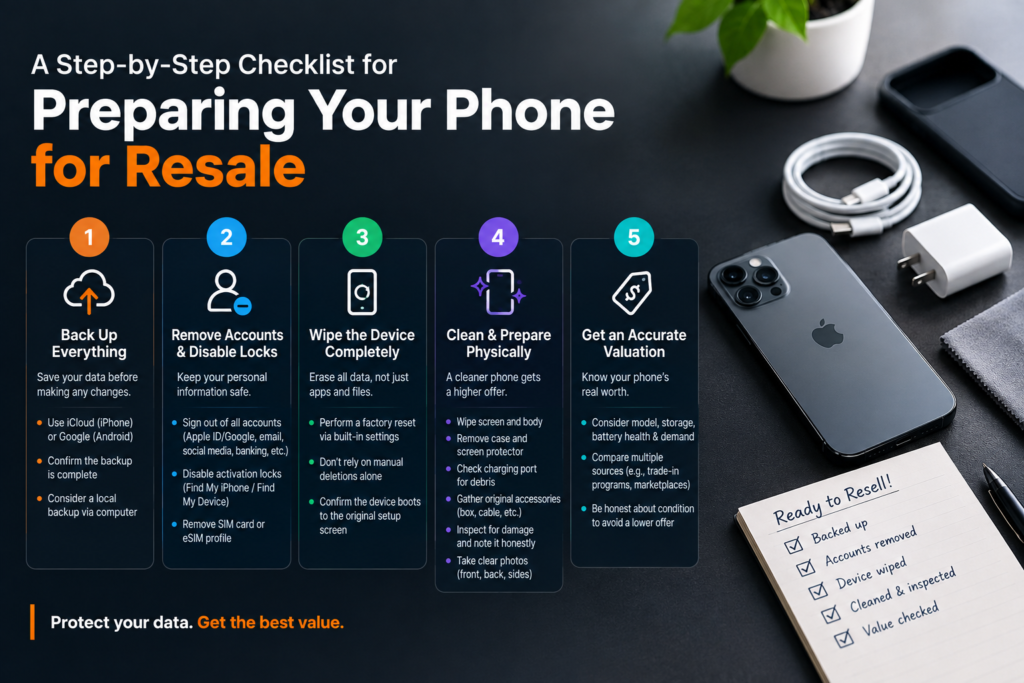
Getting a fair price for an old smartphone takes more than just handing it over and hoping for the best. Buyers, whether a marketplace stranger, a trade-in program, or a buyback platform, pay closer attention to condition and completeness than most sellers expect, and skipping a step in the prep process can mean a lower offer or, worse, personal data left exposed on a device that’s no longer in your hands. Working through preparation in the right order protects both your information and your payout, and none of it takes more than an hour or two even for someone who’s never sold a phone before.
Backing Up Everything Before You Touch a Setting
Before changing a single setting, back up the device fully. Photos, contacts, messages, and app data can all be lost permanently once a factory reset is performed, and there’s no recovering them afterward if the backup step gets skipped or rushed. Most phones support automatic cloud backup through their operating system, whether that’s iCloud for iPhones or a Google account for Android devices, and confirming that backup has actually completed, not just started, matters more than people realize.
For anyone uneasy about relying solely on cloud storage, connecting the phone to a computer and creating a local backup adds a second layer of security. Checking that contacts, photos, and any important documents or notes have transferred correctly, ideally by spot-checking a few files on the backup itself, confirms everything is safe before moving forward with the rest of the process.
Removing Accounts and Disabling Activation Locks
Once the backup is confirmed, the next step is signing out of every account tied to the device. This includes the primary account, like Apple ID or Google, along with email, social media, banking, and any other apps that store personal login information. Leaving accounts active is one of the most common mistakes people make when trying to sell a phone quickly without thinking through what stays connected after the sale.
Activation locks deserve particular attention, since a phone with “Find My iPhone” or a similar Android device-protection feature still enabled can end up locked and unusable for a new owner, even after a full factory reset. Disabling this feature specifically, rather than assuming a general sign-out handles it, prevents delays or rejected offers from buyback platforms that check for active locks during inspection. Removing a SIM card or eSIM profile at this stage also avoids any lingering connection to your mobile carrier account.
Wiping the Device Completely
With accounts cleared, it’s time to erase the device itself. A full factory reset, performed through the phone’s built-in settings rather than just deleting apps and files individually, clears stored data more thoroughly and reduces the chance that anything recoverable remains behind. Manual deletion alone often leaves traces that specialized recovery software can retrieve, which is why a proper reset matters even for sellers who feel confident they’ve already removed everything sensitive.
Before acting on a search for “sell my phone,” owners should complete their own backup, account removal, and reset process even if the buyer offers data wiping, so the handoff does not depend entirely on another party removing personal information. After the reset finishes, confirming the device boots into its original setup screen, rather than asking for a previous owner’s credentials, verifies the wipe was successful.
Cleaning and Physical Preparation
Physical condition affects resale value almost as much as functionality, and a few minutes of cleaning before listing or shipping a device often makes a real difference in the final offer. A short prep routine covers most of what buyers and resale platforms check for:
- Wipe down the screen and body with a microfiber cloth to remove fingerprints, dust, and smudges that can make a device look more worn than it actually is.
- Remove the case and any screen protector, checking underneath for trapped debris or damage that wasn’t visible while covered.
- Inspect the charging port for lint or debris buildup, which can affect functionality testing during buyer inspection.
- Gather original accessories, including the charging cable, box, or documentation, since complete sets often sell for more than a phone alone.
- Check for physical damage like cracks, scratches, or a swollen battery, and note anything found honestly rather than leaving it for the buyer to discover.
Taking a few clear photos at this stage, showing the front, back, and any existing wear, also helps if the sale goes through a marketplace listing rather than a direct buyback quote.
Getting an Accurate Valuation
With the device backed up, wiped, and cleaned, the final step before completing a sale is figuring out what it’s actually worth. Value depends on model, storage capacity, overall condition, battery health, and current market demand, all of which shift as newer models launch and older ones become less sought after. Checking a couple of different sources, rather than accepting the first quote offered, gives a more realistic picture of fair value.
Services like PayMore provide instant quotes based on entered specifications and condition, which offers a useful baseline even for sellers planning to compare against a trade-in program or a marketplace listing before deciding where to sell. Being honest about condition during this step, rather than describing a device more favorably than it actually is, prevents a lower final offer once a buyer or platform inspects the phone directly and finds discrepancies from what was originally listed.
Read More: How Businesses Use AI Phone Answering Services to Reduce Hold Times
Key Takeaways
Preparing a phone for resale works best as a sequence rather than a handful of unordered tasks: back up first, remove accounts and disable locks next, wipe the device fully, clean and inspect it physically, and only then move on to pricing and choosing where to sell. Skipping or reordering these steps risks losing personal data, leaving accounts exposed, or settling for a lower offer than the device deserves. Working through the checklist in order takes a modest amount of time but consistently results in a smoother transaction and a fairer price once the device actually changes hands.