Your team didn’t sign up to spend the morning hunting for the latest version of a file. Yet that’s where the hours go.
More software rarely fixes it. Less friction does.
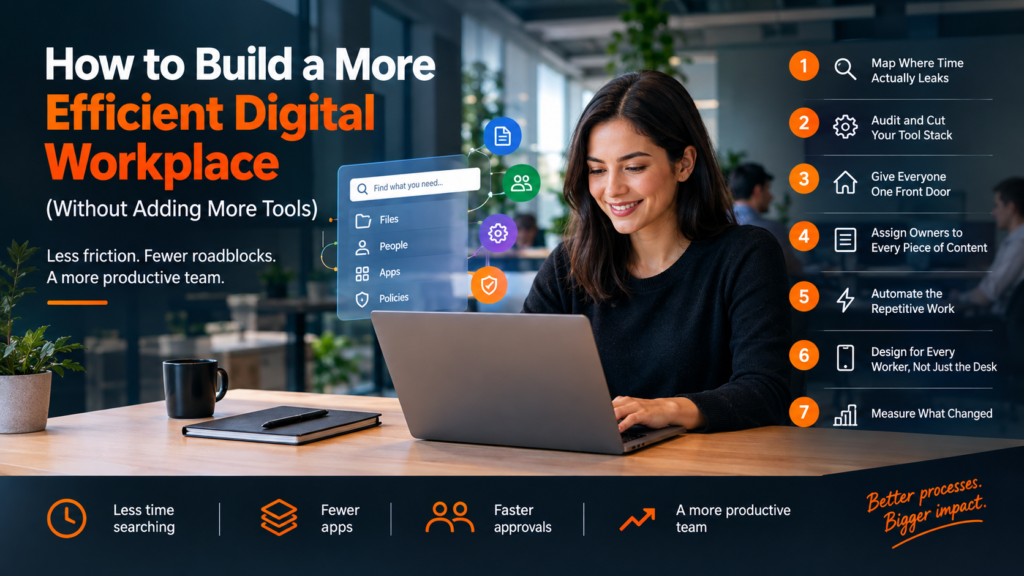
Here’s a 7-step plan to find the friction, cut it, and prove it’s gone.
What “Efficient” Really Means in a Digital Workplace
An efficient digital workplace isn’t the one with the newest apps. It’s the one where people spend the least time on work about work.
That comes down to three things. Less time searching for files, answers, and people. Less time switching between apps that do the same job. Less time waiting on approvals, access, and replies.
Every step below attacks one of those three.
Step 1: Map Where Time Actually Leaks
Don’t start with a software demo. Start with the tasks everyone repeats every week.
Pick three or four shared journeys: onboarding a new hire, requesting access to a system, finding the current version of a contract. Then sit with a few people and watch them do it. Count the clicks, the apps, and the “who do I ask?” moments.
The leaks show up fast. A new hire who waits days for a login. A sales rep who checks three folders before finding the right price list.
Write each one down. That list is your roadmap.
Step 2: Audit and Cut Your Tool Stack
Most teams don’t have a tool shortage. They have tool sprawl.
Two chat apps. Three places to store files. A project board nobody has touched since March. Every extra tool adds a login, a notification stream, and one more place for information to hide.
Run a simple audit. List every app, who owns it, who actually uses it, and what job it does. Where two tools do the same job, keep one. Where nobody uses a tool, cancel it.
While you’re at it, review who has access to what. Old accounts and stacked permissions slow people down and open security gaps, a problem known as cloud creep.
When a tool does need replacing, don’t pick whatever ad shows up first. A curated directory like Conversion Gems sorts software by task and role, with human-written verdicts on when to use a tool and when to skip it. You get a shortlist of three real options instead of ten free trials.
Step 3: Give Everyone One Front Door
If people have to remember where things live, they’ll waste time looking.
Create one starting point. That can be an intranet homepage, a pinned hub in Teams or Slack, or a shared workspace. It should link to the tools people use daily, the policies they check monthly, and a search bar that actually finds things.
The test is simple. Can a new hire find the expense policy in under a minute without asking anyone? If not, the front door needs work.
Step 4: Assign Owners to Every Piece of Content
Outdated content is worse than missing content. People follow it.
Give every page, folder, and knowledge base article a named owner and a review date. Six months works for most policies. Anything that touches pricing, legal, or security deserves a shorter cycle.
No owner? Archive it. A smaller library people trust beats a huge one they have to double-check.
Step 5: Automate the Repetitive Work
Look back at your Step 1 list. Some of those leaks are pure repetition: the same approval, the same form, the same status update.
Automate those first. Route access requests to the right approver. Trigger onboarding checklists the moment HR adds a new hire. Send weekly project summaries instead of chasing people for updates.
Start small. One automation that saves 20 minutes a week for 30 people gives you 10 hours back every week. That beats an ambitious workflow nobody trusts.
Step 6: Design for Every Worker, Not Just the Desk
A digital workplace built for laptops leaves out warehouse staff, field technicians, and store teams.
Check every core journey on a phone. Can someone on shift request time off, read an update, or find a safety procedure in two taps?
If not, those people fall back on WhatsApp groups and word of mouth. And your single front door stops being single.
Step 7: Measure What Changed
Efficiency you can’t measure is just an opinion. Pick a few numbers before you change anything, then track them monthly.
| Where time leaks | What to fix | What to measure |
| Searching for files | One front door, content owners | Time to find a key document |
| App switching | Tool audit and consolidation | Active tools per team |
| Waiting on access | Automated approval routing | Days from request to access |
| Repeated IT questions | Clear self-service content | Help desk tickets per month |
| Low adoption | Mobile-friendly design | Weekly active users on the hub |
Add a two-question pulse survey every quarter: “How easy is it to find what you need?” and “What slowed you down this week?” The second question feeds your next round of fixes.
Frequently Asked Questions
What’s the difference between a digital workplace and a digital workspace?
The digital workplace is the whole environment: tools, content, processes, and culture. A digital workspace usually means the set of apps and files one person uses day-to-day. Improve the workplace, and every workspace gets easier.
How long does it take to make a digital workplace more efficient?
Expect quick wins within 30 to 60 days, mostly from cutting duplicate tools and fixing search. Deeper changes, like content governance and automation, take a few quarters. It’s never really finished, and that’s fine.
What wastes the most time in a digital workplace?
In most companies, it’s searching. For files, for answers, for the right person to ask. Fix findability first and a lot of other problems shrink with it.
Which metrics show the changes are working?
Track time to find key documents, active tools per team, help desk ticket volume, and weekly hub usage. Pair the numbers with a short employee survey, because a metric can improve while people still feel stuck.
Your Next Step
Don’t try to fix everything at once. This week, pick one shared journey, like onboarding or access requests, and map it with two or three people who do it often. Count the apps, the handoffs, and the hours spent waiting.
That one map shows you exactly where to start. It also gives you the first number to beat.