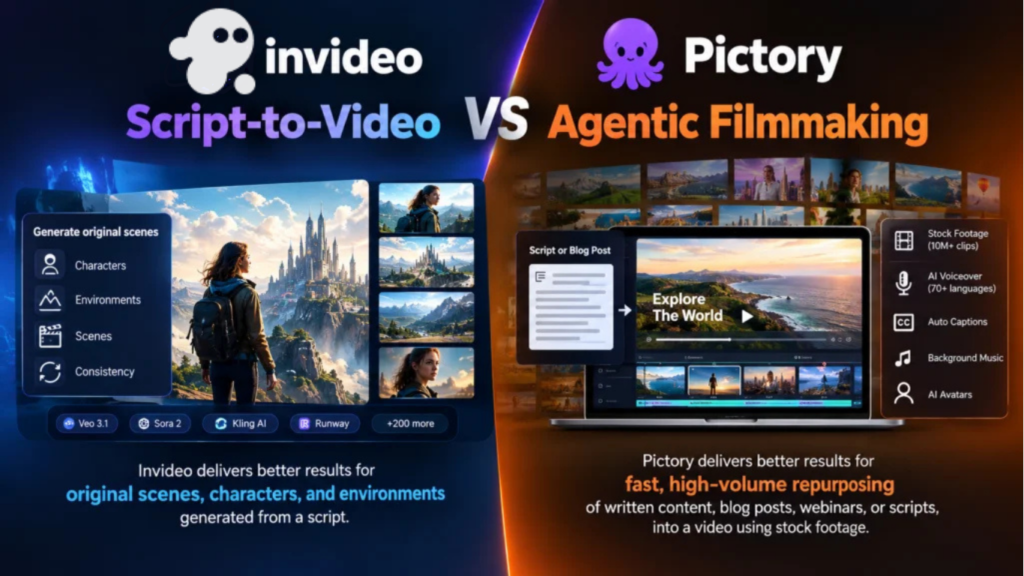
Invideo delivers better results for anything needing an original scene, character, or environment generated from a script, since Pictory doesn’t generate video at all, it matches a script to existing stock footage. Pictory delivers better results for fast, high-volume repurposing of written content, blog posts, webinars, scripts, into a video assembled from a stock library, which is genuinely what it’s built for and does quickly. These aren’t competing on the same axis so much as answering two different questions: “generate a scene that doesn’t exist yet” versus “assemble existing footage to match what I’ve already written.”
Quick answer
- Choose Pictory if the job is turning a blog post, script, or webinar recording into a video quickly using stock footage, and original scene generation was never the goal.
- Choose invideo agent if the project needs an original scene, character, or environment generated and held consistent across a project, something no stock library can provide.
- Choose Invideo Editor if you need an invideo editor to assemble and finish footage, generated or real, on a free, agentic timeline.
What each tool actually does
Pictory’s core method is genuinely a stock-footage-matching engine: paste a script, a blog post, or a URL, and its AI Scene Matching Engine analyzes the text sentence by sentence, splits it into scenes, and pulls matching clips from an integrated library of 10 million or more royalty-free assets from Storyblocks and Getty Images. It adds AI voiceover through an ElevenLabs-powered engine in 70+ languages, automatic captions, and background music, and its 2026 update added AI avatars for talking-head videos alongside voice cloning introduced in 2025. It’s genuinely fast, a 1,500-word article becomes a video in around three minutes, and it’s a strong fit specifically for content repurposing: turning existing blog posts, webinar recordings, or training material into video without touching a timeline.
invideo agent works from a fundamentally different premise: it generates original video rather than matching text to existing footage. A director describes a shot or hands over a script, and the agent plans a sequence, routing each shot to whichever of its 200+ integrated models fits that particular moment, including Veo 3.1, Sora 2, Kling AI, Seedance 2.5, Runway, PixVerse, Hailuo, WAN, Recraft, GPT Image 2.0, and Nano Banana 2, while a persistent context engine holds characters, locations, and visual rules consistent across every generated shot. There’s no stock library involved, because the scene being shown doesn’t exist as pre-recorded footage anywhere.
Invideo Editor rounds out the platform for assembling and finishing whatever footage exists, generated or real: a free, browser-based timeline editor that does what tools like DaVinci and Premiere do, drag, trim, cut, layer, while also taking agent instructions on the same timeline, with Agentic Assembly building a base cut from raw footage and dubbing that preserves lip sync across languages.
Feature-by-feature comparison
| Category | Pictory | invideo agent | Invideo Editor |
|---|---|---|---|
| Core method | Matches a script to existing stock footage | Generates original scenes, characters, and environments | Assembles and edits existing or generated footage |
| Original scene generation | No | Yes, across 200+ integrated models | No |
| Source material | 10M+ stock clips (Storyblocks, Getty) | Generated fresh per shot | Whatever footage already exists |
| Project-wide character/environment consistency | Not applicable; uses pre-existing stock clips | Yes, persistent context engine | Yes, shared project context with the agent |
| Voiceover | ElevenLabs-powered, 70+ languages | Auto-translation and voice cloning across languages | Dubbing and localization preserving lip sync |
| Free tier | No permanent free tier; 14-day trial with watermarks | No | Yes, full timeline |
| Starting price | ~$25–29/month | $17/month | Free |
Where Pictory wins
Speed for repurposing existing written content is genuinely its strength. A blog post or webinar recording becomes a captioned, narrated video in minutes, which is a real, practical need for a content team that’s already writing but not yet producing video from that writing.
A large, integrated stock library removes a separate licensing step. Storyblocks and Getty Images access built directly into the platform means a creator isn’t managing a separate stock footage subscription on top of the video tool itself.
It’s built specifically for faceless YouTube channels and content scaling. The combination of script-to-video, a large stock library, and natural AI voiceover is a genuinely well-suited stack for a creator producing volume without appearing on camera.
Where invideo wins
invideo agent generates video that doesn’t exist as stock footage anywhere. A specific character, an original environment, a moment a stock library was never going to contain, is entirely outside Pictory’s method, since it can only match a script to clips that already exist.
Persistent consistency across a fully generated project. invideo agent’s context engine holds a character or environment consistent across every generated shot, a concern that doesn’t apply to Pictory’s model of assembling independent, pre-existing clips.
A free, agentic editing timeline with no per-video cost ceiling. Pictory’s plans cap the number of videos producible per month, 10 on Starter, 30 on Professional. Invideo Editor’s timeline is free with no such cap on how much editing can happen.
No permanent free tier gap. Pictory’s only free option is a 14-day, watermarked trial. Invideo Editor’s core timeline is free indefinitely.
Pricing side by side
Pictory’s Starter plan runs roughly $25–29/month for around 10 videos with a 10-minute cap, Professional around $44–59/month for 30 videos and a 20-minute cap plus brand kits and voice cloning, and Team or Premium tiers reaching $119–199/month for higher volume and unlimited length. invideo agent’s plans start at $17/month with team and enterprise options, and Invideo Editor’s timeline is free to use regardless of plan.
Related Article: invideo vs. HeyGen: Multi-Shot Video vs. Avatar-Led Content
The verdict
These tools solve different problems well enough that the title’s framing is the accurate answer. Pictory is a fast, genuinely useful script-to-video tool specifically for repurposing existing written content into stock-footage-backed videos, at a real per-video-volume cost. invideo is built for agentic filmmaking, generating an original scene, character, or environment that doesn’t exist as pre-recorded footage, holding it consistent across a project, and finishing it on a free, agentic timeline. A content team repurposing blog posts into videos and a team producing an original branded film are, despite both starting from a script, doing genuinely different jobs, and each tool is built for one of them.
Frequently asked questions
Does Pictory generate original video the way invideo agent does? No. Pictory matches a script’s content to existing stock footage from an integrated library, it doesn’t generate an original scene, character, or environment. invideo agent generates original video across 200+ integrated models specifically because the content being shown doesn’t already exist as stock footage.
Is Pictory a good fit for repurposing a blog post into a video? Yes, this is specifically what it’s built and well-regarded for, turning written content into a captioned, narrated video using its stock library quickly, which is a genuinely different and equally valid use case from generating original scenes.
Does Pictory have a free tier the way Invideo Editor does? No. Pictory’s only free option is a time-limited, roughly 14-day trial that includes a watermark, not a permanent free tier. Invideo Editor’s core timeline is free to use indefinitely.
Which tool is better for a faceless YouTube channel? Pictory is a genuinely strong, purpose-built option for this specific use case, combining script-to-video, a large stock library, and AI voiceover for a creator who doesn’t appear on camera and is repurposing existing written content at volume.
Can invideo produce something Pictory structurally can’t? Yes. Any scene requiring an original character, environment, or moment that doesn’t exist as pre-recorded stock footage is outside what Pictory’s stock-matching method can produce, since it’s fundamentally built around assembling existing clips rather than generating new ones.