
If you searched for CNVRTool, you may be trying to find its official website, understand what the platform does, check whether it is safe, or determine whether it is worth using.
The first thing to clarify is that CNVRTool is not presented primarily as a conventional desktop application. It is a web-based platform offering a collection of online tools alongside professional digital services such as SEO audits, web design, link building, and Domain Rating/Domain Authority services.
The official site describes tools covering categories including calculators, schema markup, image editing, website management, SEO, and text analysis. Its About Us page also describes utilities such as password generation, image compression, scientific calculators, and file conversion.
This distinction matters because searches such as “CNVRTool download” or “CNVRTool login” can make it sound like you’re looking for a traditional software package. Based on the official pages reviewed for this guide, CNVRTool is better understood as an online tools and digital-services website.
Visit the official CNVRTool website
What Is CNVRTool?
CNVRTool is a website that combines free or online utilities with digital marketing and web-development services.
According to its official About Us page, the platform aims to provide user-friendly online tools for professionals, students, entrepreneurs, businesses, and individuals. The site says its tools include functions such as password generation, image compression, scientific calculations, and file conversion.
The homepage groups its tools into several broad categories:
- Calculator tools
- Schema markup generators
- Image editing tools
- Website management tools
- SEO tools
- Text analysis tools
The company also promotes professional services including:
- Web design
- SEO audits
- Link building
- Domain Rating and Domain Authority improvement
So, if you are looking for one specific “CNVRTool software,” that description can be misleading. The better mental model is a web platform containing multiple utilities and a separate digital-services business.
CNVRTool at a Glance
| Question | What the available evidence shows |
|---|---|
| What is CNVRTool? | A web-based tools and digital-services platform |
| Official website | cnvrtool.com |
| Desktop download | No dedicated desktop download was identified on the reviewed official pages |
| Login | No general account-login requirement was identified on the reviewed homepage |
| Online tools | Yes |
| SEO services | Yes |
| Web design | Yes |
| Link building | Yes |
| Public pricing | No clear general pricing schedule was identified on the reviewed official pages |
| Founder/CEO | Vishal Rahangdale |
| Privacy policy | Published |
| First-hand testing for this article | None |
The official About Us page identifies Vishal Rahangdale as Founder/CEO of cnvrTool.
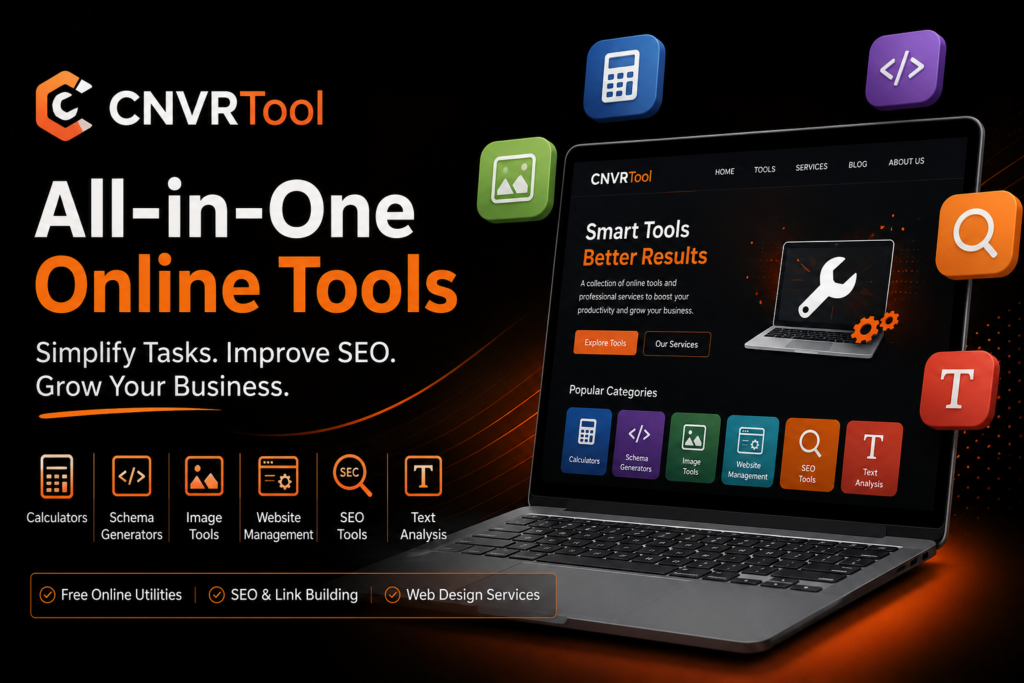
CNVRTool Features
CNVRTool’s feature set is broad rather than focused on one particular task.
Online utility tools
The platform says it provides online utilities designed to simplify routine digital tasks. Examples mentioned by CNVRTool include password generation, image compression, scientific calculators, and file conversion.
One concrete example is its PNG-to-JPEG converter. The tool allows a user to select a PNG file, convert it, and download the resulting JPEG. The page describes the converter as free and browser-based.
This type of utility is useful when you need a quick task completed without installing dedicated software.
SEO tools
CNVRTool has an SEO-tools category and separately advertises professional SEO auditing and link-building services. Its SEO audit service says it examines areas such as website structure, speed, keywords, and overall SEO health.
For casual users, these tools may be useful for basic checks. However, businesses requiring deep keyword databases, competitor intelligence, backlink research, rank tracking, or large-scale technical auditing may need a specialized SEO platform.
Image tools
Image-related utilities are another major category on the site. CNVRTool specifically lists image editing tools and provides image-conversion functionality such as its PNG-to-JPEG converter.
The practical advantage is convenience: if the task is simple, a browser-based converter can be faster than opening a full image editor.
Schema markup tools
CNVRTool also lists a Schema Markup Generator among its tool categories.
Schema markup can help search engines understand structured information on a page. However, generating markup is only part of the job. Users should still validate the resulting code and ensure that it accurately describes visible page content.
Google’s current guidance specifically emphasizes that structured data should match the visible content of a page.
Calculator and text-analysis tools
The platform also identifies calculator and text-analysis categories. These are useful for users who want small utilities in one place rather than maintaining a collection of separate websites.
How Does CNVRTool Work?
For most online tools, the process is straightforward:
- Open the relevant CNVRTool page.
- Enter information, upload a supported file, or select the required options.
- Let the browser-based tool process the request.
- Review the result.
- Copy, save, or download the output when the particular tool provides that option.
For example, CNVRTool’s PNG-to-JPEG converter instructs users to select a PNG, choose the conversion action, and then download the converted JPEG.
The exact workflow varies by tool. A calculator may only require text or numbers, while an image converter requires an upload.
Does CNVRTool require installation?
The available official information points toward browser-based use rather than conventional software installation.
That means you generally should not need to download an executable CNVRTool program simply to use an online utility.
If you encounter a third-party website offering a supposed “CNVRTool installer,” it is sensible to verify that download independently before opening it. For routine browser-based tasks, start from the official domain rather than an unknown download site.
CNVRTool Tutorial: How to Use CNVRTool
There is no single tutorial that applies to every CNVRTool feature because the platform contains different tools.
A practical approach is:
Step 1: Start from the official website
Open the official CNVRTool domain rather than relying on third-party download pages or unofficial mirrors.
Step 2: Choose the appropriate category
The homepage organizes tools into categories including SEO, image editing, website management, schema, calculators, and text analysis.
Step 3: Open the specific utility
Select the tool that matches your task. Read any instructions on the page before uploading files or entering information.
Step 4: Provide only the information needed
Avoid entering sensitive information into an online utility unless you understand why it is required and how the information is handled.
Step 5: Download or copy the result
Where a tool supports downloading, use its provided download function. For example, the PNG-to-JPEG tool explicitly provides a download step after conversion.
CNVRTool Login: Do You Need an Account?
The question “CNVRTool login” suggests that users may expect an account-based SaaS application.
However, a general login requirement was not identified on the CNVRTool homepage or the official pages reviewed for this guide. The site prominently presents online tools and contact-based professional services rather than a conventional software dashboard.
That does not mean every future CNVRTool feature will necessarily work without an account. Websites can change their authentication systems, so users should check the specific tool page if they encounter a login prompt.
CNVRTool Download: Is There a Desktop Version?
A dedicated CNVRTool desktop download was not identified in the official pages reviewed.
This is important because “download” can mean two different things:
- Downloading CNVRTool itself: No dedicated desktop application was identified.
- Downloading a result from a CNVRTool tool: Some utilities, such as the PNG-to-JPEG converter, provide downloadable output.
For safety, avoid downloading purported CNVRTool installers from unrelated file-sharing sites unless the official website specifically links to them.
CNVRTool Pricing
Pricing is one area where caution is warranted.
The official website clearly advertises professional services and explains a general process involving consultation, placing an order, and payment. However, the reviewed official homepage and About Us pages do not provide a comprehensive public price list for CNVRTool’s services.
The site’s online tools are presented in several places as free or online utilities. Its PNG-to-JPEG converter, for example, is explicitly described as free.
Therefore, the most accurate description of CNVRTool pricing is:
- Some online utilities are presented as free.
- Professional services may involve payment.
- A universal public CNVRTool pricing table was not found in the official material reviewed.
- Businesses interested in services such as web design, SEO audits, or link building should request current pricing directly.
Do not rely on old blog posts, screenshots, or third-party pricing claims if you are making a purchasing decision.
CNVRTool Review: Pros and Cons
Because no first-hand testing was available for this article, this should be treated as a research-based review rather than a personal hands-on review.
Pros
Broad collection of tools: CNVRTool combines several utility categories under one domain.
Browser-based convenience: Many tasks can be handled online without installing a conventional desktop program.
Free utilities are available: At least some individual tools are explicitly described as free.
Additional professional services: Businesses can also approach CNVRTool for SEO audits, web design, link building, and related services.
Identifiable operator: The About Us page names Vishal Rahangdale as founder and CEO.
Privacy policy: CNVRTool publishes a privacy policy describing categories of information it may collect and how information may be handled.
Cons
Broad rather than specialized: Users needing advanced SEO research or professional-grade media processing may find specialist platforms more capable.
Pricing transparency is limited: There is no single public pricing table covering the advertised professional services in the reviewed material.
No first-hand benchmark here: This guide does not claim that every tool was personally tested.
Is CNVRTool Safe?
There is no responsible basis for describing any online service as completely risk-free.
CNVRTool does have several positive trust signals. It has an active official website, an About Us page, a named founder/CEO, a contact mechanism, and a published privacy policy.
For normal, low-risk tasks, reasonable precautions include:
- Use the official domain.
- Avoid uploading confidential documents unless necessary.
- Do not enter passwords, financial credentials, private keys, or sensitive personal information into generic online tools.
- Review the privacy policy before submitting data.
- Keep original copies of important files.
- Verify downloaded files before opening them.
If a task involves confidential corporate, financial, legal, medical, or personally identifying information, a locally operated or enterprise-controlled tool may be preferable.
Is CNVRTool Legit?
The available evidence supports treating CNVRTool as a real operating website and digital-services brand, rather than automatically assuming it is a fake download site.
The official site identifies its services and provides contact information, while the About Us page identifies Vishal Rahangdale as founder and CEO. A privacy policy is also publicly available.
However, “legitimate website” and “right choice for you” are different questions.
There is limited independent evidence available from established third-party review sources, so it would be excessive to describe CNVRTool as independently verified, universally trustworthy, or proven superior to established competitors.
For paid services, perform normal due diligence:
- Request a written quote.
- Confirm exactly what is included.
- Ask about deliverables and timelines.
- Check cancellation/refund terms.
- Avoid paying for vague promises.
- For SEO services, ask how link building is performed and what practices are used.
That last point is particularly important because Google warns against manipulative SEO practices and link schemes.
CNVRTool Alternatives
CNVRTool is broad, so there is no single perfect replacement. The best alternative depends on what you actually need.
| Need | CNVRTool | Alternative worth considering |
| Simple image compression | Yes | TinyPNG |
| File conversion | Yes, for some formats | CloudConvert |
| Advanced SEO | Basic/broad tools plus services | Semrush or Ahrefs |
| Keyword and backlink research | Limited compared with specialist suites | Ahrefs or Semrush |
| Technical SEO | Available as a service/tool category | Ahrefs or Semrush |
| Quick online utilities | Strong fit | Specialist single-purpose tools |
| Professional web design | Offered | Compare agencies or specialist developers |
TinyPNG for image compression
TinyPNG is a strong alternative when your primary need is image compression and conversion.
Its official site supports formats including JPEG, PNG, WebP, AVIF, and related formats, and offers browser-based compression. It also publishes specific information about upload limits, processing, and image retention.
Choose TinyPNG when image optimization is your main requirement rather than a broad collection of utilities.
CloudConvert for file conversion
CloudConvert is better suited when you need extensive file-format conversion. Its official site says it supports more than 200 formats spanning documents, images, audio, video, archives, and other categories.
For users who regularly convert many different file types, this specialization can be more useful than a general-purpose tools website.
Semrush for advanced SEO
Semrush is a much more specialized choice for serious SEO and digital marketing work.
Its SEO Toolkit includes keyword research, backlink management, rank tracking, on-page analysis, and technical SEO auditing.
If your main goal is professional SEO research rather than occasional utility tasks, Semrush is a more natural comparison.
Ahrefs for SEO and backlinks
Ahrefs is another major alternative for SEO professionals.
Its platform includes Site Explorer, Keywords Explorer, Site Audit, Rank Tracker, Content Explorer, and backlink-related capabilities. Ahrefs also offers free tools for tasks such as keyword research, backlink checking, and SEO analysis.
For backlink research and competitor SEO analysis in particular, Ahrefs is worth comparing before purchasing an SEO service.
Who Should Use CNVRTool?
CNVRTool makes the most sense for users who want convenient browser-based utilities in one place.
It may suit:
- Students performing occasional digital tasks
- Bloggers and website owners
- Small businesses
- Beginners learning SEO
- Users who need simple image or file conversions
- Businesses interested in bundled web and SEO services
Its breadth is arguably its biggest attraction.
Who May Want an Alternative?
Consider a specialist alternative if:
- You need advanced SEO datasets.
- You manage large SEO campaigns.
- You need extensive keyword or backlink research.
- You process many different file formats professionally.
- You need enterprise security controls.
- You need detailed published pricing and service specifications.
- You need a desktop application rather than browser tools.
In these situations, a specialized product can provide more depth, documentation, integrations, or transparency.
Final Verdict: Is CNVRTool Worth Trying?
CNVRTool is best understood as a multi-purpose online tools website combined with a digital-services business, not as a single downloadable software application.
Its official site documents a broad range of tools and services, including calculators, schema, image, website, SEO, and text-analysis utilities, alongside SEO audits, web design, link building, and DR/DA services.
For simple online tasks, there is little reason to overcomplicate things: use the relevant tool, avoid submitting sensitive information, and download your output when appropriate.
For paid professional services, take a more deliberate approach. Ask for current pricing, clarify deliverables, and evaluate the proposed SEO methods before committing.
For the latest tools and services, start with the official site rather than an unofficial download or review page.
Frequently Asked Questions
What is CNVRTool?
CNVRTool is a web-based platform offering online utilities across categories such as SEO, image editing, calculators, schema markup, website management, and text analysis. It also offers professional services including SEO audits, web design, and link building.
Is CNVRTool free?
Some CNVRTool online tools are presented as free. For example, its PNG-to-JPEG converter is explicitly described as a free online tool. Professional services may require payment, and a comprehensive public price list was not identified in the official pages reviewed.
Does CNVRTool have a login?
A general CNVRTool login requirement was not identified on the main official pages reviewed. Some individual services or future features could have different requirements.
Can I download CNVRTool?
CNVRTool is primarily presented as an online platform rather than a conventional desktop application. Some individual tools allow you to download their output, such as converted files.
Is CNVRTool safe?
YES! CNVRTool has an official website, published privacy policy, contact information, and an identified founder.
Is CNVRTool legit?
YES!
Who owns CNVRTool?
The official About Us page identifies Vishal Rahangdale as Founder and CEO of cnvrTool.
What are the best CNVRTool alternatives?
It depends on the task. TinyPNG is a stronger specialist option for image compression, CloudConvert for broad file conversion, and Ahrefs or Semrush for advanced SEO research.