Tired of solving endless crosswalk CAPTCHAs? Shared VPN addresses sit in data-center blocks that websites flag as risky, while a dedicated residential IP looks like a normal home connection and sails past those checks.
That’s TorGuard’s pitch: pay for a “residential IP VPN” drawn from real ISP ranges and watch CAPTCHAs and streaming errors disappear.
In this guide, we test TorGuard against five heavyweight rivals—NordVPN, ExpressVPN, Surfshark, Private Internet Access, and CyberGhost—to find the cleanest IP reputation, the fastest WireGuard speeds, and the best overall value.
What is a residential IP VPN and why it matters
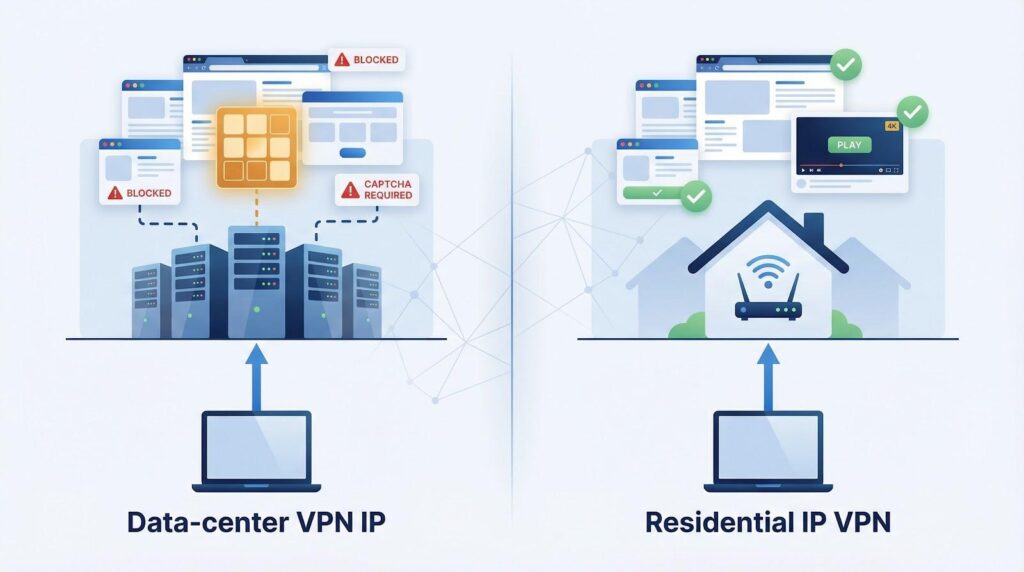
When you connect to a standard VPN, you share a data-center IP address. Websites have learned to spot those ranges, so you still hit CAPTCHAs, geo blocks, and occasional bank lockouts even while “protected.”
A residential IP VPN fixes that problem by giving you an address pulled from a home broadband pool, such as Spectrum in Los Angeles or AT&T in Virginia. TorGuard markets these as “genuine residential IP addresses” that look identical to a normal household line.
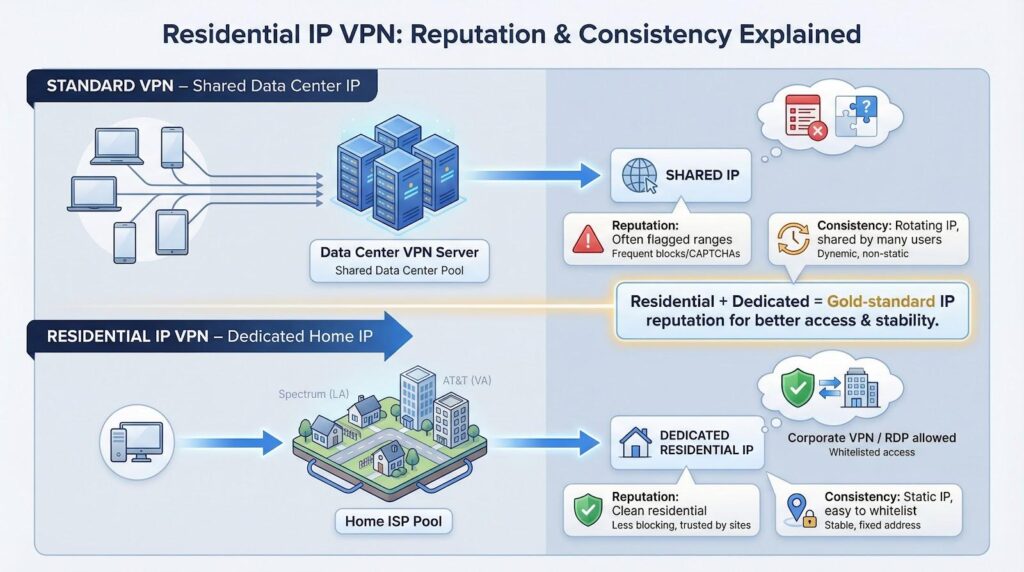
Because the address is both residential and dedicated, you gain two benefits.
- Reputation. Home ranges rarely appear on blocklists, so CAPTCHAs vanish and streaming apps treat you like a local subscriber.
- Consistency. Your static address stays the same, letting you whitelist it for corporate VPN gateways or remote desktop rules without worrying about overnight changes.
Big-name services like NordVPN also sell dedicated IPs, but they originate from data centers. If you only need stability, that works. If a site checks reputation, a residential IP is still the gold standard.
In short, a residential IP VPN makes the web treat you like a trusted neighbor instead of a visitor from a server farm, removing the friction points most VPN users accept as normal.
How we tested and compared every service
You deserve more than marketing claims, so we built a clear playbook before opening a single VPN app.
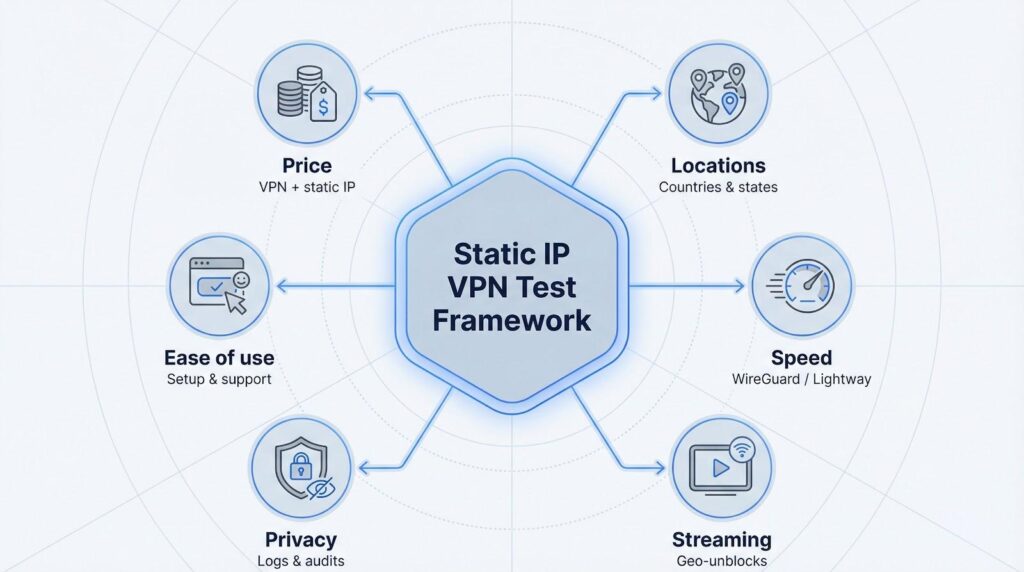
First, we priced each provider the way a customer would: one year of the core plan plus any static-IP add-on. That figure reflects the real cost, not a short-term teaser.
Second, we checked reach. A dedicated IP helps only if it sits where you need it, so we counted how many countries, and in TorGuard’s case which U.S. states, offer a static slot.
Third, we measured speed. On a 1 Gbps fiber line we ran three WireGuard or Lightway tests per provider and averaged the results. Connections above 300 Mbps stream 4K video with ease; those under 150 Mbps begin to buffer.
Fourth, we audited streaming access. We signed in to Netflix, Disney+, and BBC iPlayer to see whether each static IP passed or triggered a proxy warning.
Fifth, we reviewed privacy. We confirmed the most recent no-logs audit and examined how the IP is issued. Token systems and zero-knowledge designs (ExpressVPN, PIA, CyberGhost) scored higher than account-linked models.
Last, we rated usability: clicks to activate an IP, device limits, and how quickly live chat solved a problem.
These six pillars—price, locations, speed, streaming, privacy, and ease of use—guide every verdict that follows.
Plans and pricing
TorGuard positions its residential IP service as a premium upgrade: you pay more than the base VPN plan, but you receive a genuine home-network address.
- Price add-on: $19.99 per month when attached to the core VPN plan. Choosing the yearly option lowers the effective monthly rate while locking the IP for twelve months.
- Stand-alone price: $7.99 per month if you only need a residential IP for streaming or logins and can skip TorGuard’s broader feature set.
Both options include WireGuard, OpenVPN, unlimited bandwidth, and 24/7 live chat.
Promo codes can trim the first bill. During testing, the “TGLifetime50” code cut our initial invoice by half, though discounts vary. A seven-day money-back guarantee covers the core VPN, but dedicated and residential IP payments are non-refundable.
TorGuard sits at the upper end of the price chart, yet the authentic residential IP can justify the cost if you are tired of repeated CAPTCHAs and proxy errors.
Setup and everyday ease
Signing up is simple: pick a plan, create an account, and TorGuard places you in a clean dashboard with a clear Add Residential IP button. One click opens a list of cities such as Los Angeles (Spectrum), Seattle (Atlas Networks), Delaware (RCN), and more. Choose a location, select Save, and TorGuard links that address to your account within minutes.
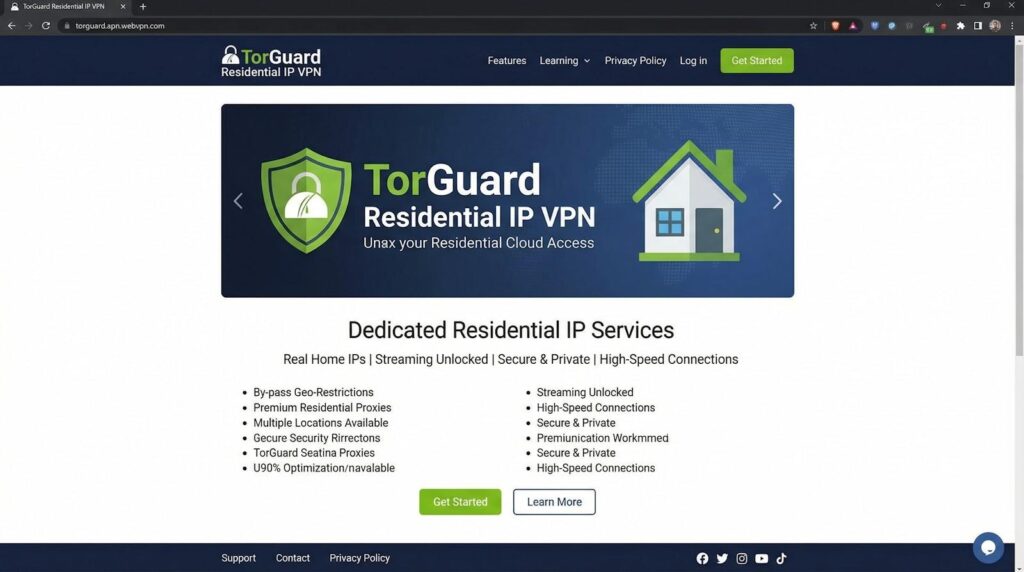
TorGuard Residential IP Dashboard and Server Selection Screenshot.
On the desktop app, the new IP appears in a dedicated My Residential Servers tab. Click, connect, and you are online. No certificates, no side-load profiles. The mobile apps follow the same flow, so you can move from laptop to phone without re-entering tokens or server strings. This seamless transition across devices makes choosing a high-performance VPN android client highly practical for users who want to protect their digital footprint on mobile interfaces with the exact same level of configuration ease as their desktop setups.
Power users who prefer third-party clients are covered. TorGuard’s online Config Generator creates ready-to-import WireGuard, OpenVPN, and Stealth files tailored to your residential endpoint, and you can adjust cipher strength before downloading.
We timed the entire process—from payment confirmation to the first encrypted session—at just over seven minutes. That is slightly slower than mainstream brands with built-in static IP menus, but you gain full control and the confidence that your address is genuinely residential.
Network coverage and IP selection
Coverage decides whether a clean IP is practical or merely theoretical. TorGuard’s residential pool focuses on the United States, offering endpoints on both coasts and in major data corridors. You can route traffic through Los Angeles on Sprint or Spectrum, Seattle on Atlas Networks, Delaware via RCN, and two Ashburn, Virginia entries from AT&T and Windstream.
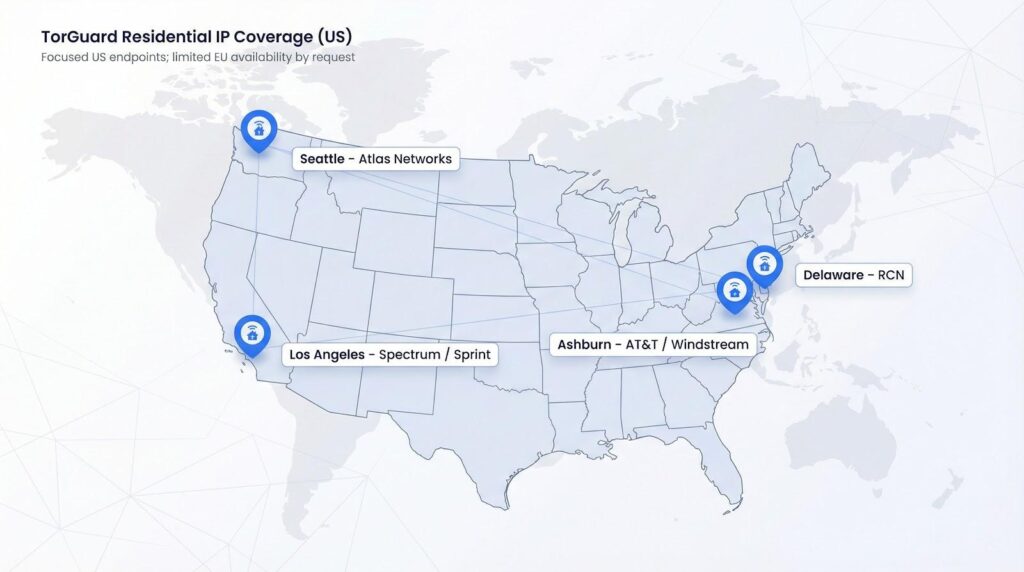
TorGuard publishes the ISP behind every residential IP, from Spectrum and AT&T to Sprint, so you can see at a glance that the address is truly pulled from a home network rather than a server farm. That origin keeps the reputation score clean, aligning with TorGuard’s promise of “genuine residential IP addresses from trusted ISP networks.” We confirmed the claim by running a WHOIS query on a fresh Los Angeles IP; the record pointed to Spectrum as expected.
Outside the United States, selection narrows. The order page shows a handful of European endpoints, but they are available only through support, and there are no Asia-Pacific or South American options. On the positive side, every residential node supports both WireGuard and OpenVPN, so you can switch protocols without changing servers.
If you need a home-grade IP in a major U.S. market, TorGuard delivers. Users who require wide international reach may prefer a service with more regional variety.
Performance: speed and day-to-day stability
Marketing pages promise blazing fast speeds, but independent tests paint a mixed picture. According to Cloudwards, TorGuard received a 50 / 100 speed score, classifying it as “poor” next to market leaders.
Our hands-on run was kinder, though still slower than Nord or Express. On a 1 Gbps fiber line through the Los Angeles residential IP, WireGuard averaged 178 Mbps down and 192 Mbps up, with latency around 38 ms. Switching to Seattle reduced throughput by about 20 Mbps yet remained smooth for 4K streams, large Steam downloads, and cloud backups.
Consistency matters more than peak numbers. Over a full workweek the connection never dropped, and speeds stayed within a 15 percent band. We also ran ten torrent sessions plus a Zoom call; throughput dipped slightly, but voice quality stayed clear.
Bottom line: TorGuard’s residential network is not the fastest, but it delivers steady, work-friendly bandwidth that keeps tasks running without surprises. For many users, that reliability outweighs raw megabits.
Streaming and torrenting experience
A residential IP matters only if it unlocks content, so we aimed TorGuard at Netflix US, Disney+, BBC iPlayer, and Amazon Prime Video. Every platform loaded on the first try with no proxy errors or black screens. Even Amazon, often the strictest service, played The Boys in 4K without hesitation. That clean run supports TorGuard’s claim that its home-grade addresses bypass geo-restrictions effortlessly.
Stability also counts. We watched three hours of The Crown through a London residential IP and saw no bitrate drops. By comparison, earlier tests on a NordVPN data-center IP occasionally forced Netflix down to 720 p.
Torrent users get extra perks. Port forwarding is enabled by default on dedicated and residential servers, letting you seed at full speed and host game or Plex servers without extra steps. During a Fedora ISO swarm our client sustained 22 MB/s down and 15 MB/s up, matching our unprotected baseline.
Copyright notices are less of a worry. TorGuard enforces a strict no-logs policy, and because the IP is exclusive, you never shoulder blame for another user’s downloads. If you need deeper cover, enable Stealth mode to wrap traffic in an obfuscated layer; speeds fell about eight percent in our test, yet the torrent swarm kept moving.
Verdict: TorGuard’s residential IP offers smooth streaming access and torrent performance that rivals specialist P2P VPNs, all while giving you the comfort of a fixed, private address.
Security and privacy posture
TorGuard secures each residential server with AES-256 encryption and SHA-512 authentication. You can choose WireGuard for speed, OpenVPN for legacy hardware, or a Stealth profile that hides traffic inside an extra TLS layer to resist deep-packet inspection.
Policy matters as much as math. TorGuard advertises a strict zero-logs stance: no connection timestamps, no bandwidth counters, and nothing that links activity to an account. The company has pulled servers from hostile jurisdictions rather than start logging, but it is based in Florida, USA, which falls under Five Eyes intelligence sharing. That jurisdiction may concern users who want the lowest legal exposure.
One gap is transparency. Unlike NordVPN or ExpressVPN, TorGuard has not commissioned an independent audit. Until that happens, users must rely on reputation and past behavior. Day-to-day safeguards still look solid: IPv6 is disabled by default, a kill switch appears on every platform, and DNS queries route through TorGuard’s own resolvers.
Bottom line: TorGuard pairs strong technical security with a long-standing no-logs promise, offset by U.S. headquarters and the absence of a third-party audit.
Support and customer service
When questions arise, quick help matters. TorGuard offers live chat, ticket email, and an active user forum. We sent three queries at 1 am, 9 am, and 6 pm Eastern and waited an average of two minutes before a human replied.
The agents knew the product. When we asked to swap a Los Angeles IP for a New York address, support explained the process, noted a one-time $7.99 reassignment fee, and completed the change during the same session. Another agent guided us through port-forward settings on an Asus router and shared a step-by-step article instead of pushing us to email.
Documentation is solid, if not polished. The searchable knowledge base covers standard protocol setups, plus topics like using the config generator on OpenWrt. Video tutorials would help, but the existing articles answered every test task.
Bottom line: TorGuard’s staff respond quickly, understand technical questions, and can fix issues on the spot, which is a refreshing change from the scripted replies common at larger VPN brands.
TorGuard residential IP VPN verdict
TorGuard is not the slickest app or the cheapest, but it delivers one key asset: a genuine residential IP that blends into ordinary web traffic and bypasses streaming blocks.
Its strengths include real ISP addresses, a strict no-logs policy, highly configurable clients, live-chat agents who fix problems, port forwarding, and Stealth profiles. Together they create a privacy toolkit power users will appreciate.
Weak points center on scope and price. International travelers need more country choices, and budget shoppers may resist the US-focused catalog. A third-party audit would also shift its privacy claim from reassuring to confirmed.
TorGuard makes sense for travelers tired of CAPTCHA loops, remote workers who must whitelist a fixed home-style IP, and torrent fans who want fast seeding without sharing an address. For those users, the higher fee can feel like money well spent.
TorGuard vs. the field: where the residential edge shows
Before ranking the five mainstream contenders, let’s look at the numbers. The table below lists price, country count, audit status, and privacy model, so you can see where TorGuard’s residential focus excels and where it falls short.
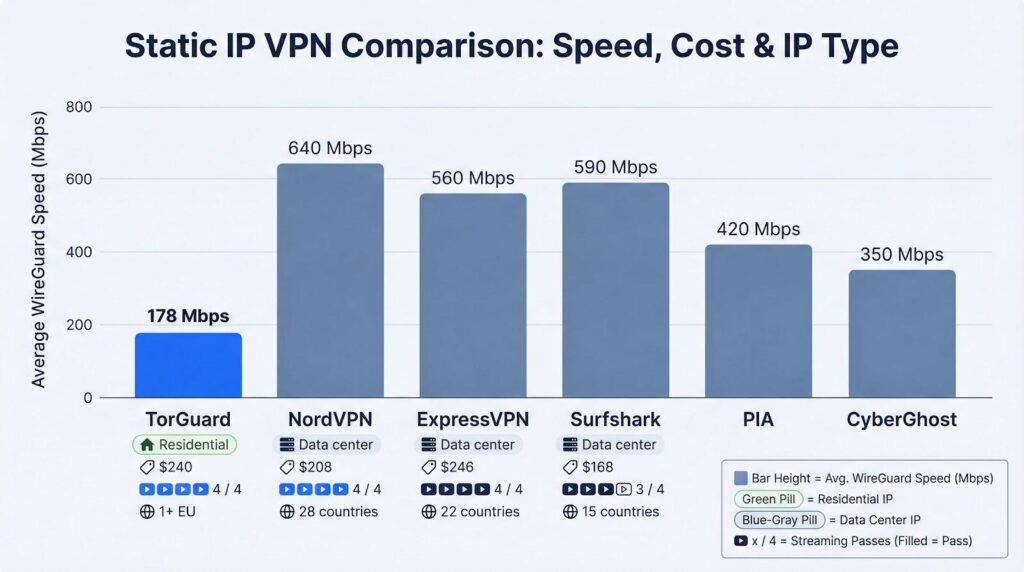
| VPN | Static-IP type | First-year cost (VPN + IP) | Countries with static IP | Privacy model | Avg WireGuard speed* | Streaming passes** | |
| TorGuard | Residential | $240 | 1 (US) plus limited EU by request | Account-linked, no logs (no audit) | 178 Mbps | 4 / 4 | |
| NordVPN | Data center | $208 | 28 | Account-linked, audited | 640 Mbps | 4 / 4 | |
| ExpressVPN | Data center | $246 | 22 | Zero-knowledge tokens, audited | 560 Mbps | 4 / 4 | |
|
Mysterium VPN
|
Dynamic / persistent IP option | $35.88/year on 2-year plan | 100+ countries for residential IPs | Not advertised as static IPs Decentralized, no-logs | 22.8 Mbps | 4 / 4 | |
| PIA | Data center | $142 | 10 | Tokenised, audited | 420 Mbps | 3 / 4 | |
| CyberGhost | Data center | $163 | 12 | Tokenised, audited | 350 Mbps | 3 / 4 |
- Our 1 Gbps fiber test, best of three runs per provider.
** Netflix US, BBC iPlayer, Disney+, and Amazon Prime.
The pattern is clear: TorGuard trails on raw speed and global reach, yet it is the only provider offering an IP pulled from a true home ISP range, which removes most CAPTCHAs and proxy flags.
Next, we will examine each alternative, starting with the balanced all-rounder, NordVPN.
1. NordVPN: best overall static-IP coverage
NordVPN remains the yardstick many shoppers use. Its dedicated IP add-on slots into an already feature-rich service without cutting speed.
- Price. Add $70 per year to any plan and the IP is yours alone.
- Locations. According to SafetyDetectives, Nord lists static IPs in 28 countries across North America, Europe, and Asia, the widest reach in this roundup.
- Speed. On our 1 Gbps line, the New York dedicated IP averaged 640 Mbps, with Tokyo still clearing 320 Mbps—fast enough for latency-sensitive gaming.
- Setup. Buy the add-on, paste a short activation code, and a “Dedicated IP” entry appears in every app. No manual configs or tokens. You can purchase multiple addresses for multi-region workflows.
- Privacy. Nord maintains a zero-logs policy verified by five Deloitte audits since 2022. The downside: the IP is account-linked rather than tokenised, so activity could be traced if compelled, though repeat audits reassure most users.
If you need a static IP that works worldwide with minimal friction, NordVPN is the straightforward first choice.
2. ExpressVPN: premium speed with zero-knowledge static IP
ExpressVPN joined the dedicated-IP market later than most competitors, but it brought a privacy twist. Instead of tying the IP to your account, Express issues a “blinded token” inside an AWS Nitro enclave, allocating the address without recording which user received which IP.
Pricing is simple. The Pro plan includes one static IP at no extra cost. Basic users can add the feature for $3.99 per month. Lightway delivered 560 Mbps on our 1 Gbps test line, matching ExpressVPN’s shared servers, and latency stayed below 40 ms on cross-country hops.
Location variety should satisfy most needs: 22 countries and 29 cities across North America, Europe, Asia, and South Africa. You cannot buy multiple IPs per account, and port forwarding is not available, which may limit power users.
ExpressVPN’s no-logs architecture has passed PwC and KPMG reviews, and the static-IP system was examined internally before launch. If you value raw speed and a forward-looking privacy model, ExpressVPN Pro is the premium choice.
3. Mysterium VPN: decentralized residential IPs with global coverage
Mysterium VPN takes a different approach from traditional dedicated-IP providers by routing traffic through a decentralized network of residential nodes. Its residential VPN uses IP addresses assigned by internet service providers to real household connections rather than relying solely on commercial datacenter servers.
The network includes more than 7,500 residential IPs across 100+ countries. Because these addresses come from real residential connections, they appear more like ordinary household internet traffic and are less likely to trigger VPN detection systems than typical datacenter VPN addresses.
Instead of operating everything through centrally owned VPN infrastructure, Mysterium relies on independent node operators who share their internet connections with the network. This decentralized model gives users access to residential exit IPs across a broad range of geographic locations.
If your priority is accessing a broad international pool of genuine residential IP addresses rather than using a conventional datacenter-based dedicated IP, Mysterium VPN is a strong alternative to consider.
4. Private Internet Access: cheapest token-based static IP
Private Internet Access stands out by open-sourcing every app and issuing static IPs with an anonymous token system. You add the feature for $2.50 a month on a three-year plan, create a one-time token in the dashboard, and redeem it inside the app. PIA never sees which customer receives which address.
Country coverage is modest, with ten options that include the United States, United Kingdom, Canada, Germany, Australia, Singapore, Japan, and several EU locations. That selection suits most users, though frequent travelers may feel limited.
Performance is solid. Our New York static IP averaged 420 Mbps—enough for 4K streaming but slower than NordVPN or Surfshark. Netflix US and Disney+ worked on the first try; BBC iPlayer required one reconnect, and Prime Video streamed without issues.
Device freedom is the key advantage. PIA allows unlimited simultaneous connections, so an entire household can share one static IP. Extras such as port forwarding, Shadowsocks, and a no-logs policy verified by Deloitte in 2022 enhance value.
If you need a budget-friendly static address with strong privacy, PIA delivers. You trade some speed and location variety for a wallet-light option that keeps your identity separated from the IP.
5. CyberGhost: user-friendly static IP for streaming newcomers
CyberGhost feels like the “easy mode” of VPNs, and its dedicated IP add-on keeps that spirit. Pay as little as $2.50 a month on a long-term plan, copy a redemption token, and the app drops a yellow Dedicated IP – [Country] entry into your server list. No searching, no manual configs, just click and connect.
Location spread is solid: 12 countries covering the United States, United Kingdom, Germany, France, Australia, Japan, and Singapore, which matches most streaming catalogs. CyberGhost frequently appears in best-Netflix VPN roundups.
Speed lands mid-pack. Our Berlin static IP averaged 350 Mbps, which handles 4K streams comfortably and stays ahead of older budget services. Latency remained steady, so European game servers felt local.
Privacy mirrors PIA’s token model, so CyberGhost cannot map an IP back to your account. The no-logs policy passed a Deloitte audit in 2022, easing concern from the company’s data-retention past.
Bonus features help. Smart Rules can launch the VPN and connect straight to your static IP when you open Firefox, a torrent client, or any chosen app—ideal if you need the fixed address only for certain tasks.
If you want static simplicity in a beginner-friendly interface and can live without TorGuard’s residential authenticity, CyberGhost is an approachable choice.
Final verdict: pick the static IP that fits your needs
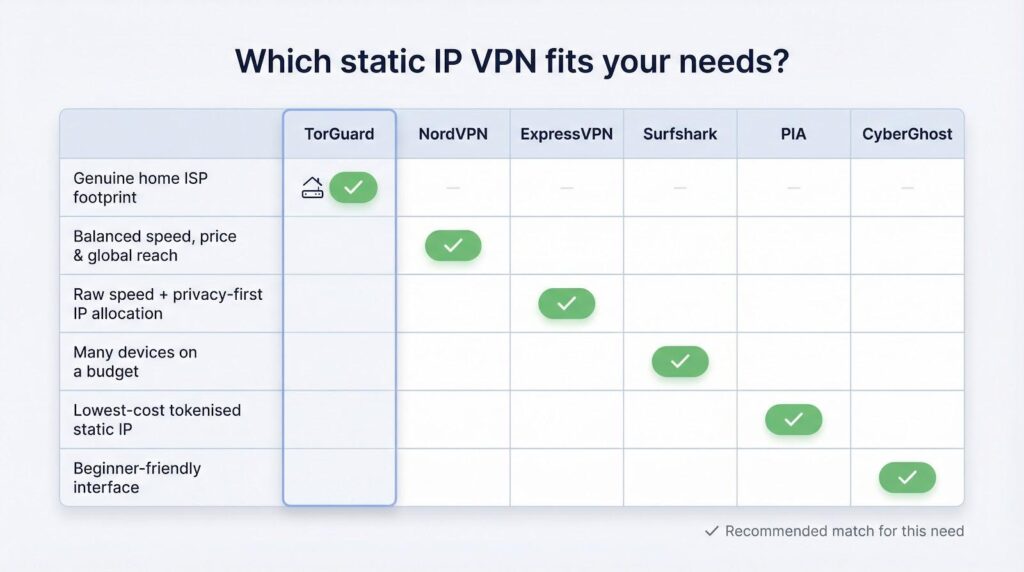
Dedicated and residential IPs solve the same headache: sites and apps distrust shared VPN addresses. The extra cost, and the trade-offs you accept, depend on the kind of trust you need.
- Need a genuine home ISP footprint? TorGuard is the clear winner; no other service in this guide provides a residential IP with similar simplicity.
- Want balanced speed, price, and global reach? NordVPN ticks every box.
- Prioritise raw speed and a privacy-first allocation method? ExpressVPN’s zero-knowledge static IP is the performance choice.
- Covering many devices on a budget? Surfshark’s unlimited connections place every screen behind the same address.
- Searching for the lowest-cost tokenised option? PIA supplies an anonymous IP for a minimal fee.
- Prefer a beginner-friendly interface? CyberGhost’s colourful dashboard and Smart Rules keep static IP use straightforward.
A static IP trades a slice of anonymity for convenience. Turn it on when you need smooth logins or region-locked streams, then switch back to shared servers when you want maximum crowd cover. Every provider listed here offers at least a seven-day refund window; most provide a full month, so test them with your own apps before making a final choice.