Midjourney killed its free tier. Adobe Firefly wants a subscription. Most “free” AI image tools quietly ask for a credit card before you generate anything useful. If you’ve been sitting on the sidelines wondering whether AI image generation is worth your time — and your money — here’s the good news: Kimg AI lets you test premium models without spending a single cent.
I. Why Free Trials Have Become a Myth
A year ago, hopping between free AI image tools was easy. Now almost every major tool has closed its free tier or capped it so aggressively that you can barely generate five images before hitting a paywall.
Students, hobbyists, and curious beginners are the ones who lose out the most. You want to explore what AI can actually do — but you’re not ready to commit $20/month to a tool you’ve never used. That hesitation is completely reasonable.
Kimg AI takes a different approach. Instead of a stingy trial, it hands new users a genuinely usable amount of free credits upfront — enough to run real tests on real premium models.
II. Breaking Down the Free Credit System
- Sign-Up Bonus: 400 Credits on Day One
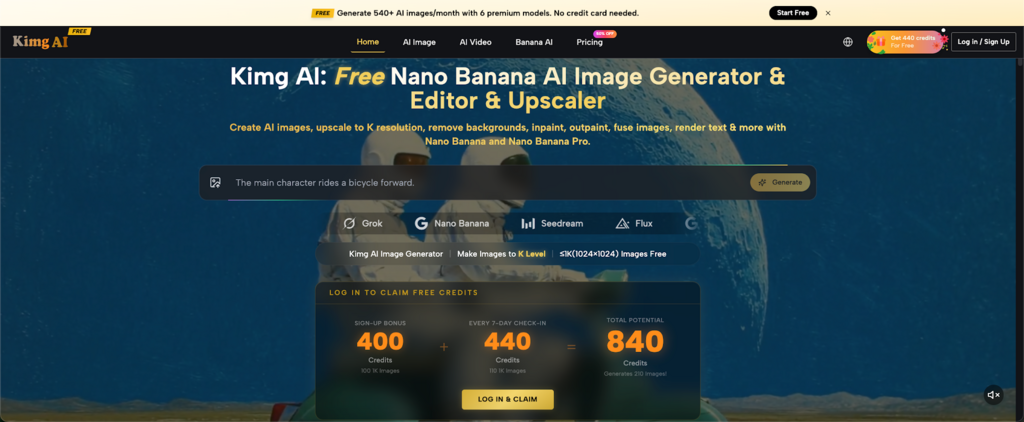
Create a free account and 400 credits land in your wallet immediately. No credit card. No verification hoops.
Models like Nano Banana Pro, Nano Banana 2, and Seedream 5.0 Lite each cost 4 credits per generation. At that rate, 400 credits alone gets you 100 images — before you’ve done anything else.
- Weekly Check-In: 440 More Credits
Log in every 7 days and collect 440 additional credits through the check-in bonus. Stack that with your sign-up bonus: 400 + 440 = 840 credits total, which works out to exactly 210 generations at 4 credits each.
This isn’t a drip-feed designed to frustrate you. It’s a real working budget that lets you genuinely evaluate whether the tool fits your needs.
III. What You Can Actually Do With Those Credits
Free credits don’t mean access to watered-down models. On Kimg AI, the free credits work across a solid lineup of capable models — here’s what’s worth trying.
- Nano Banana Pro — Precision With Reference Support
Nano Banana Pro is built for users who need tighter output control. Upload up to 8 reference images and the model works much harder to match your visual intent. For character design, brand content, or anything style-specific, the reference feature alone makes a noticeable difference.
- Nano Banana 2 — Built for Complex Projects
Nano Banana 2 supports up to 13 reference image uploads — the most in the Nano Banana family. When visual consistency matters across multiple outputs, this is the model to reach for. Free credits apply here, so it’s worth spending a few just to see how it handles a demanding brief.
- Seedream 5.0 Lite — A Different Visual Language
Seedream 5.0 Lite brings a painterly, atmospheric quality that sets it apart from the Nano Banana models. It costs the same 4 credits per generation, making it an easy side-by-side comparison. Users working on creative or editorial content will find it particularly expressive.
- GPT Image 2 — Sharp Instruction-Following in Action
GPT Image 2 is one of the newer additions to Kimg AI‘s model library. It handles prompt instructions with impressive precision and produces clean, detailed outputs across a wide range of subjects — from product visuals to illustrated concepts. For users curious how it stacks up against the others, free credits make that comparison completely risk-free.
IV. How the Credit Math Actually Works
Here’s a simple breakdown so there’s no guesswork:
| Sign-up bonus | 400 credits |
| 7-day check-in bonus | 440 credits |
| Total available | 840 credits |
| Cost per generation (Nano Banana Pro, Nano Banana 2, Seedream 5.0 Lite) | 4 credits |
| Total free images | 210 images |
That’s not a marketing exaggeration — it’s arithmetic. And since the check-in bonus resets weekly, consistent users can keep accumulating free credits over time without ever touching a payment method.
V. Models at a Glance
Kimg AI hosts a wide model library spanning image generation, editing, and video. Here’s an overview of what’s available — from the 4-credit models ideal for free-tier testing to the heavier hitters worth upgrading for:
Image Generation Models
| Model | Strength | Credits per Generation |
| Nano Banana Pro | Photorealism, reference-guided output, brand & character work | 4 |
| Nano Banana 2 | Visual consistency, multi-scene projects, up to 13 reference images | 4 |
| Seedream 5.0 Lite | Painterly aesthetics, fast iteration, creative editorial | 4 |
| Seedream 4.0 | High-fidelity stylized output, versatile art styles | 4 |
| GPT Image 2 | Reliable all-rounder, style transfer, anime & illustration | 30 |
| Flux Kontext Pro | Context-aware editing, text-in-image, object-level precision | 30 |
| Flux Kontext Max | Maximum editing fidelity, complex scene modifications | 40 |
| Grok Imagine | Creative and experimental imagery, strong stylistic range | 30 |
| Qwen Image Edit | Smart image editing, object replacement, background control | 30 |
For free-tier users, the 4-credit models — Nano Banana Pro, Nano Banana 2, Seedream 5.0 Lite, and Seedream 4.0 — are where the 840-credit budget stretches furthest. The 30-credit models are still accessible with the free balance, just at a smaller volume.
VI. Tips for Getting the Most Out of Free Credits
Running through credits on low-quality test prompts is the fastest way to waste a sign-up bonus. A few habits make the free budget go further:
- Start focused. Pick one model and learn its behavior before jumping to another. Understanding how Nano Banana Pro responds to prompts produces better results than surface-testing four models in one session.
- Use reference images. With Nano Banana Pro and Nano Banana 2, even a single uploaded reference image noticeably improves output consistency. Don’t overlook this feature — it’s one of the most practical things that separates these models from basic generators.
- Test across models deliberately. Once a preferred prompt style is established, run the same prompt through Seedream 5.0 Lite or GPT Image 2 to see how the aesthetic shifts. Same credit cost, very different results.
- Check in weekly. The 440-credit bonus doesn’t accumulate automatically — a manual login is required. Set a weekly reminder and collect it consistently.
Read More: Beyond the Prompt: Engineering Repeatable Workflows with Image to Video AI
VII. Who This Is Actually For
This isn’t a guide for professional studios with tool budgets. It’s for the art student who wants to prototype a project. The social media manager curious whether AI image tools are worth the hype. The small business owner who needs a few product mockups but can’t justify a monthly subscription yet.
Kimg AI‘s free credit structure removes the financial barrier entirely. There’s no argument about “wasted money” if it turns out AI generation isn’t the right fit — because nothing was spent. And if it does turn out to be useful, users have already built real hands-on experience with multiple premium models before ever considering a paid plan.
That’s a rare thing in a category where almost everyone else leads with a credit card form. So skip the paywalls, skip the credit card forms, and just start creating — 400 free credits are waiting the moment you sign up.