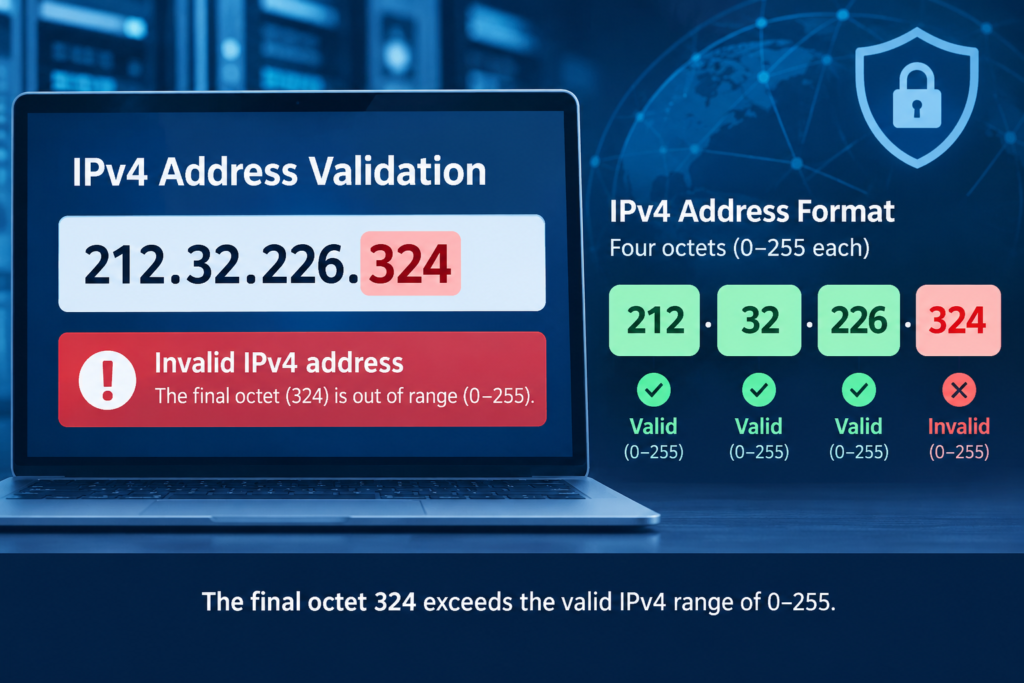
If you encountered 212.32.226.324 in a server log, security alert, browser message, or other technical record, the first question is simple: is it actually a valid IPv4 address?
No. 212.32.226.324 is not a valid conventional IPv4 address because its final section, 324, exceeds the maximum value allowed for an IPv4 octet.
That distinction matters. An invalid IP string does not automatically mean that an attacker spoofed their address. It could be the result of a typo, malformed data, an application or logging problem, or deliberate manipulation.
For another example of handling unusual IP-address strings and troubleshooting malformed address information, see Webweq’s guide to 164.68.1111.161 IP address issues.
Here’s how to validate the address and investigate the context without jumping to conclusions.
Is 212.32.226.324 a Valid IP Address?
No.
A standard IPv4 address contains four numerical components separated by periods. RFC 791 describes an Internet address as a fixed-length address consisting of four octets, or 32 bits.
For example:
192.168.1.10— structurally valid8.8.8.8— structurally valid212.32.226.10— structurally valid212.32.226.324— invalid
The problem is the fourth octet:
324
An IPv4 octet contains 8 bits, giving it a numerical range of 0 through 255. Therefore, 324 cannot represent a standard IPv4 octet.
The address has the correct number of components, but one component is outside the permitted range.
The simple validation
Break the string apart:
| Octet | Value | Valid IPv4 range | Result |
|---|---|---|---|
| 1 | 212 | 0–255 | Valid |
| 2 | 32 | 0–255 | Valid |
| 3 | 226 | 0–255 | Valid |
| 4 | 324 | 0–255 | Invalid |
So if you’re asking “is 212.32.226.324 valid?”, the answer is no.
Why 212.32.226.324 Fails IPv4 Validation
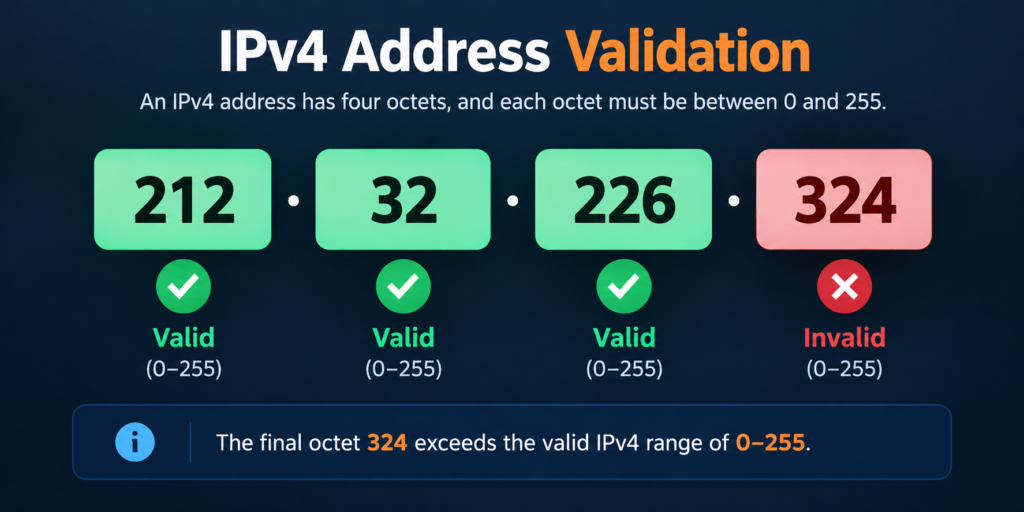
IPv4 provides 32 bits for an address. Those bits are conventionally displayed as four 8-bit octets.
Each octet can represent 256 possible values:
0 through 255
The number 324 requires more than eight bits, so it cannot occupy one IPv4 octet.
This is not a question of whether an IP belongs to a suspicious company, country, hosting provider, or network. The address fails a more basic test: it is not syntactically valid IPv4 notation.
IANA maintains authoritative registries for IPv4 address space and special-purpose address blocks. Those registries are useful after an address has passed basic syntax validation.
Useful for authoritative information about IPv4 address-space allocation. IANA IPv4 Address Space Registry
Could 212.32.226.324 Be a Spoofed IP?
Possibly in the broad sense that data may have been falsified or manipulated, but the invalid string alone is not evidence of IP spoofing.
This distinction is important.
IP spoofing generally refers to manipulating the source address information associated with network traffic. An invalid text string found in a log is a different problem. The string might never have represented a valid IPv4 source address at the network layer.
For example, an application could receive or construct a value such as:
212.32.226.324
and write it into a log file without validating it first.
Alternatively, a monitoring system could have incorrectly parsed another field and produced an invalid-looking address.
A human could also simply have mistyped a legitimate address.
Therefore, don’t treat the appearance of this string as proof that an attacker successfully connected from that address.
Why Might an Invalid IP Address Appear in Server Logs?
There are several possible explanations.
1. Typing or configuration error
The simplest possibility is an ordinary mistake.
Someone might have intended to enter a valid address but entered 324 instead of another number.
This can happen in configuration files, support tickets, firewall rules, documentation, scripts, or manually maintained records.
2. Application validation problems
A web application or internal tool may accept an IP-like string without checking whether every octet is within the valid range.
If the value is later written to a log, the malformed address can appear to be a genuine network identifier even though it is not.
3. Log parsing problems
Security tools frequently process information from multiple sources.
A parser may combine fields incorrectly, extract an IP-like value from an unusual location, or interpret malformed input as an address.
When investigating an anomaly, look at the original raw log entry, not just the normalized result produced by a dashboard.
4. Deliberately malformed input
Attackers sometimes send unusual input to test how applications handle unexpected data.
That does not mean every malformed IP is malicious. However, repeated malformed values associated with authentication attempts, scanning behavior, application errors, or other suspicious events deserve closer examination.
5. Documentation or example data
An invalid address may also be present in test data, examples, automated testing, or synthetic monitoring.
Context is therefore more informative than the string alone.
How to Investigate 212.32.226.324
If you found this value in a server or security log, use a structured investigation rather than immediately blocking or reporting it.
Step 1: Check the original event
Find the complete log entry containing the string.
Record useful surrounding information such as:
- Timestamp
- Request method
- Requested URL
- Hostname
- User agent
- Source port, if available
- Destination service
- Authentication result
- HTTP status code
- Related error messages
- Other addresses recorded in the same event
The surrounding fields may reveal whether the value is actually being treated as a network source address.
Step 2: Validate the IP format
Check each component independently.
For 212.32.226.324, the fourth component fails immediately because 324 is outside the IPv4 octet range.
This means a conventional 212.32.226.324 IP lookup cannot be treated like a normal lookup for a legitimate IPv4 address.
Step 3: Check nearby values
Look at events immediately before and after the suspicious entry.
You may discover something such as:
212.32.226.24212.32.226.34- another address entirely
- repeated malformed values
A nearby valid address could indicate a transcription or parsing mistake, although you should not assume that without examining the raw data.
Step 4: Check the logging pipeline
Determine where the value originated.
For example:
Client → Reverse proxy → Web server → Application → SIEM
If the value first appears in application logs but not in the web server or proxy logs, the problem may be related to application processing rather than the underlying network connection.
Step 5: Check legitimate threat-intelligence sources for valid addresses
Services such as AbuseIPDB provide reporting and lookup functionality for IP addresses associated with potentially abusive activity.
However, an invalid address should not be forced through an IP reputation workflow simply because it resembles an IPv4 address.
First establish that you have a valid address.
Step 6: Compare with authoritative registries
For a valid public IPv4 address, IANA’s address registries can help identify the relevant allocation and special-purpose status. IANA explains that its IPv4 registries cover address-space allocations and special-purpose ranges.
This is useful for valid addresses, but it does not turn an invalid address into a valid one.
Why a Normal IP Lookup May Not Work
A conventional IP lookup expects a valid address.
Because 212.32.226.324 contains an out-of-range octet, a lookup service may:
- Reject the input
- Return a validation error
- Normalize or alter the input
- Produce no useful result
That is expected behavior.
Do not interpret the absence of lookup information as proof that the address belongs to an anonymous attacker.
There is an important difference between:
“No information exists for this address.”
and
“This is not a valid IPv4 address.”
In this case, the second statement is the more fundamental finding.
Is 212.32.226.324 a Security Threat?
The string itself is invalid IPv4 notation, but that does not establish that your system has been attacked.
The security significance depends on the surrounding event.
For example, an isolated malformed value in a test environment is very different from hundreds of malformed values appearing alongside repeated login failures and suspicious requests.
Look for patterns such as:
- Repeated authentication failures
- Unexpected administrative requests
- Exploit attempts
- High-volume scanning
- Unusual request paths
- Repeated malformed input
- Connections associated with known valid suspicious IP addresses
- Unexpected changes to application or server configuration
An invalid address can be a clue, but it should be treated as one piece of evidence rather than a complete diagnosis.
Common Mistakes When Investigating an Invalid IP
Assuming invalid means malicious
Not necessarily. A typo or software defect can create an invalid address.
Treating an IP lookup as proof of identity
Even for valid addresses, an IP lookup generally identifies network allocation information rather than proving who personally operated a connection.
Blocking the wrong address
A firewall cannot meaningfully block 212.32.226.324 as a normal IPv4 address because it is not a valid IPv4 address.
Instead, identify the actual valid source address associated with the event before creating a block rule.
Ignoring the raw logs
A dashboard may transform, normalize, or aggregate data. Always inspect the original event when an address looks impossible.
Confusing spoofing with malformed data
A malformed text value and a forged network-layer source address are not interchangeable concepts.
A Practical 212.32.226.324 Safety Check
If this address appears in your environment, use this sequence:
- Validate the syntax.
- Confirm that the fourth octet is 324.
- Check the raw event.
- Identify which component generated the value.
- Review nearby events.
- Look for associated valid IP addresses.
- Investigate suspicious activity around the same timestamp.
- Use IP reputation databases only for valid addresses.
- Check relevant IANA/RIR information for legitimate public addresses.
- Document the finding before changing firewall or security controls.
This approach reduces the chance of mistaking a logging problem for an intrusion—or overlooking a genuine security event because the data initially looked strange.
What to Do If You Keep Seeing Invalid IP Addresses
Repeated malformed addresses can indicate a problem worth investigating even when the individual value is not routable.
For a website or application, review:
- Input validation
- Log formatting
- Reverse-proxy configuration
- CDN headers
- Trusted proxy settings
- IP extraction code
- SIEM parsing rules
- Firewall and WAF logs
- Application error logs
If multiple systems report the same event differently, compare their timestamps and raw records. This can help identify where the malformed value entered the logging pipeline.
If the event is accompanied by clearly suspicious activity, investigate the valid network indicators associated with it rather than relying on the malformed string alone.
The Bottom Line
212.32.226.324 is not a valid IPv4 address. Its first three octets are within the normal 0–255 range, but the final octet, 324, is not. RFC 791 defines IPv4 addresses as four-octet, 32-bit addresses, while IANA maintains the authoritative IPv4 address-space registries.
That makes the string more likely to be a typing, formatting, parsing, or intentionally malformed value than a usable IPv4 address.
However, the invalid format alone cannot tell you why it appeared. If you found it in server logs, investigate the complete event, identify the source of the logged value, and look for associated valid IP addresses and suspicious activity.
For another example of handling unusual IP-address strings and troubleshooting malformed address information, see Webweq’s guide to 164.68.1111.161 IP address issues.
12. FAQ Section
Frequently Asked Questions
Is 212.32.226.324 a valid IP address?
No. IPv4 uses four octets, with each octet ranging from 0 through 255. Because 324 exceeds that range, 212.32.226.324 is invalid IPv4 notation.
Why does 212.32.226.324 look like an IP address?
It has the familiar four-part IPv4 structure, but having four numerical components is not enough. Each component must contain a valid octet value.
Is 212.32.226.324 a spoofed IP?
The malformed string alone does not prove spoofing. It may result from a typo, parsing error, application behavior, malformed input, or other data-processing issue.
Can I perform a normal IP lookup on 212.32.226.324?
A conventional IP lookup requires a valid IP address, so this value should first be treated as invalid input rather than as an ordinary public IPv4 address.
Should I block 212.32.226.324?
Do not automatically create a firewall rule based solely on this string. First determine where it came from and identify any valid source address associated with the event.
Can an invalid IP appear in server logs?
Yes. Applications, logging systems, parsers, monitoring tools, and manually entered data can contain malformed IP-like strings.
How can I investigate an unusual IP safely?
Start with the raw log event, timestamp, request details, surrounding events, and the system that generated the value. For valid public addresses, reputation services and IP allocation registries can provide additional context.
Does an invalid IP mean my website was hacked?
No. An invalid IP in a log is not sufficient evidence of compromise. Look for additional indicators such as unauthorized access, suspicious requests, configuration changes, malware, or repeated attack patterns.
Author information: Gordon Henry is a technology and digital business writer who creates practical, easy-to-understand content about online payments, business technology, digital tools, and emerging trends. His writing focuses on helping small businesses and professionals understand technology and choose solutions that fit their needs.