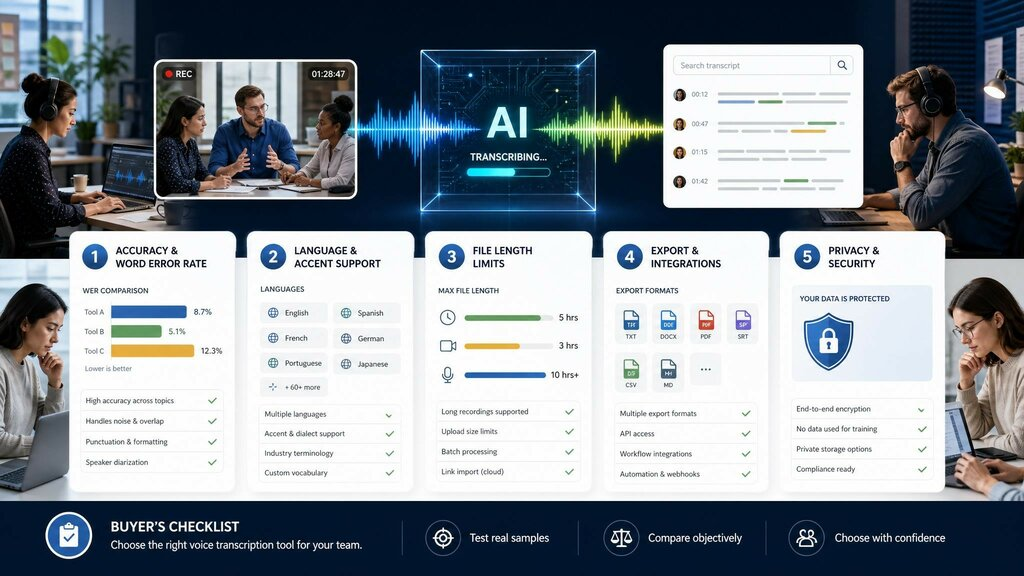
To choose a voice transcription tool well, check five things in order: accuracy (word error rate), language support, length limits, export formats and integrations, and privacy. Skip any one and you risk paying for software that mangles names, caps your files, or locks your text where you cannot use it. This article is for professionals, researchers, and content teams who evaluate voice transcription software and want a clear, vendor-neutral checklist rather than marketing claims. Below, I walk through each criterion, explain the technical terms you will see on pricing pages, and give you a reusable scoring table so two people can compare the same tools and reach the same shortlist.
Key Takeaways
- Accuracy first: judge audio to text accuracy by word error rate (WER) on your audio, not a vendor’s demo clip.
- Languages: confirm the tool actually transcribes the languages and accents you record — counts range from a handful to 50+.
- Length limits: free tiers often cap minutes per month; check the ceiling before you commit.
- Exports and integrations: demand TXT, DOCX, PDF, Markdown plus the platforms you already use.
- Privacy: read where audio is stored, how long, and whether it trains models.
- Use the 5-Point Buyer Checklist below to score every option the same way.
1. Accuracy and Word Error Rate
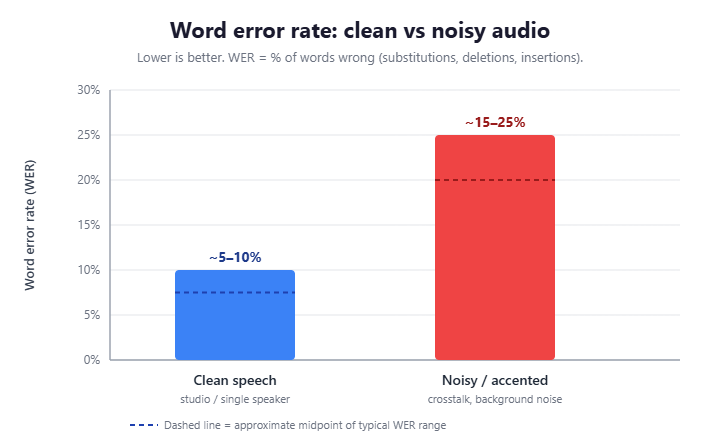
Accuracy is the criterion everything else depends on. The industry measures it with word error rate (WER) — the percentage of words the system gets wrong through substitutions, deletions, or insertions. A WER of 5% means roughly 1 word in 20 is incorrect; lower is better. When evaluating different transcription platforms and reading an Recommended AI speech-to-text tools guide, accuracy should remain your top priority, as marketing claims often differ from real-world performance. When a vendor advertises “99% accurate,” they are usually quoting 1% WER on clean studio audio, which rarely matches a noisy conference room.
Modern engines are strong but not flawless. OpenAI’s open-source Whisper model, released in 2022, was trained on about 680,000 hours of multilingual audio, which is why so many tools build on it. Even so, accuracy drops with crosstalk, heavy accents, and background noise, so test on a real sample of your own recordings before you buy.
2. Language and Accent Support
A tool that nails English may stumble on Mandarin, Hindi, or Brazilian Portuguese. If you record interviews abroad or work on a multilingual team, transcription languages are a hard requirement, not a nice-to-have. Whisper itself supports transcription in roughly 99 languages (per OpenAI Whisper), but each product exposes only a subset, and quality varies sharply between high-resource and low-resource languages.
Two questions cut through the marketing. First, is your specific language listed for transcription (not just the interface)? Second, does it handle the accents you actually record? A platform advertising 50+ languages is meaningless if your Scottish-accented English comes back garbled. Ask for a trial and feed it your hardest audio.
3. File Length and Upload Limits
This is where free tiers quietly bite. Many transcription apps cap monthly minutes or per-file length. As a public example, Otter.ai‘s free Basic plan limits transcription to 300 minutes per month, with a 30-minute cap per conversation (per Otter.ai pricing) — fine for occasional notes, frustrating for a researcher with 20 hour-long interviews.
Before committing, calculate your real monthly volume in minutes and compare it against the plan ceiling. Tools that advertise unlimited length remove this anxiety, but verify whether “unlimited” applies to upload duration, monthly total, or both. A 90-minute lecture should not require splitting into three uploads.
4. Export Formats and Integrations
Transcribed text is only useful where you can edit and share it. Check that the tool exports the formats your workflow needs — at minimum TXT and DOCX, ideally PDF, Markdown, and HTML for documentation and web teams. Subtitle creators also need timestamped formats like SRT or VTT.
Integrations matter just as much. If your meetings live in Zoom or Google Meet, a tool that captures them automatically saves a manual upload every time. As a concrete example that meets these export and integration criteria, Vomo AI exports to TXT, DOCX, PDF, Markdown, and HTML and supports common media types such as M4A, MP3, WAV, and MP4 (per Vomo); you can see its audio to text workflow and judge whether this tool fits your stack. For balance, Notta.ai and Fireflies.ai cover similar ground with different integration emphases.
5. Privacy and Data Security
Voice recordings are sensitive — they may contain client names, financials, or unpublished research. Before you upload, read the privacy policy for three things: where audio is stored, how long it is retained, and whether your recordings train the vendor’s models. Look for encryption in transit and at rest, and for compliance signals such as GDPR or SOC 2.
If you handle regulated data, confirm you can delete files on demand and that a deletion actually purges them. Per the EU’s official GDPR guidance, individuals have a right to erasure of personal data; a transcription vendor serving EU users should support that in practice, not just in policy.
The 5-Point Buyer Checklist (Reusable Asset)
Copy this scoring table and rate each tool 1–5 per row. The highest total wins your shortlist.
| # | Criterion | What to verify | Tool A | Tool B | Tool C |
| 1 | Accuracy (WER) | Test onyour audio; target WER under 10% | |||
| 2 | Languages | Your language + accent listed for transcription | |||
| 3 | Length limits | Monthly minutes / per-file cap ≥ your volume | |||
| 4 | Exports & integrations | TXT, DOCX, PDF, Markdown + your platforms | |||
| 5 | Privacy | Storage, retention, training use, GDPR/SOC 2 | |||
| Total (out of 25) |
Read More: Seamless Transition from Exchange Server 2019 to Exchange Server SE
Conclusion
When you choose a voice transcription tool, resist the headline accuracy claim and run the full five-point check: audio to text accuracy by WER, real language and accent coverage, honest length limits, the export formats and integrations your workflow needs, and a privacy posture you can verify. Score each option with the reusable table above so your decision is repeatable rather than emotional. Then do the one thing demos cannot fake — upload your own hardest recording, read the result, and let the transcript decide.
FAQ
What is a good word error rate for transcription software? For clean, single-speaker audio, a WER at or below 5% is excellent, and under 10% is usable for most business notes. Noisy multi-speaker recordings naturally score worse, so always benchmark a tool on your own difficult audio rather than trusting a vendor’s polished demo clip.
Do I need a tool that supports many transcription languages? Only if you record them. A monolingual English user gains nothing from 50+ languages. But multilingual teams, researchers, and global creators should confirm each specific language and accent is supported for transcription, since coverage and quality vary widely between high- and low-resource languages.
Why do file length limits matter so much? Because they cap real work. Free tiers commonly limit you to a few hundred minutes monthly, which a single batch of interviews can exhaust. Estimate your monthly minutes first, then pick a plan whose ceiling clears that number with room to spare, or choose unlimited-length software.