Finding the official website for one company is easy. Finding the correct website for hundreds or thousands of companies is a different problem.
A sales team may have a spreadsheet containing company names but no domains. A recruiter may have employer names gathered from job applications. A marketing team may inherit an old CRM with incomplete website fields. In each case, searching every company manually is slow, while blindly accepting the first automated result can introduce bad data.
That is where Target Company URL Research becomes useful.
The goal is simple: start with a company name, identify the most likely official domain, evaluate how confident the match is, and send only reliable results into the next stage of your workflow.
Why Finding a Company Domain Is Harder Than It Looks
A company name does not necessarily map cleanly to a single website.
Consider a company called “Bolt.” There may be multiple organizations using that name or variations of it. The same problem appears with short names, generic words, regional businesses, subsidiaries, and companies that have changed names.
Even an apparently obvious result can be wrong.
A company-name lookup may return several candidates. For example, a lookup for “Salesforce” can return both salesforce.com and another domain beginning with the same name. The source API documentation uses this example to demonstrate why selecting the first result without checking the match can create bad CRM data.
This is why a reliable workflow needs more than a simple:
company name → first result → domain
Instead, think:
company name → candidate domains → matching → verification → confidence → approved domain
That extra layer is what makes automated enrichment more useful.
What Is Target Company URL Research?
Target Company URL Research is the process of identifying the web domain associated with a specific target company.
For a B2B prospecting workflow, the input might look like this:
| Company Name | Domain |
|---|---|
| Salesforce | salesforce.com |
| HubSpot | hubspot.com |
| Notion | notion.com |
| Figma | figma.com |
The challenge begins when the company name is ambiguous or the data is incomplete.
A domain lookup service can return candidate companies and their domains. The job of the enrichment workflow is then to determine which candidate best corresponds to the original company name.
This makes domain research useful for:
- CRM data cleanup
- Account-based marketing
- Sales prospecting
- Lead enrichment
- Recruiting
- Company research
- Database deduplication
- Outbound marketing
- Internal data pipelines
A domain can also be a more useful identifier than a company name when consolidating records, because multiple records may contain slightly different versions of the same business name.
Why Accurate Domains Matter in B2B Data
A wrong domain can cause problems far beyond one incorrect spreadsheet cell.
Suppose a sales team imports 5,000 target accounts into a CRM. If the domain field is wrong, subsequent enrichment steps may associate the account with the wrong organization.
That can affect:
- Contact discovery
- Email enrichment
- Company research
- Account segmentation
- Website analysis
- CRM deduplication
- Lead routing
- Personalization
- Reporting
The solution is not necessarily to eliminate automation. It is to make automation confidence-aware.
High-confidence matches can move through automatically. Ambiguous matches can be flagged for review.
Read More: AI-Powered CRM Automation: How Autonomous Workflows Are Transforming B2B Revenue
The Basic Company-Name-to-Domain Workflow
A practical workflow has five stages.
1. Normalize the company name
Company databases often contain legal suffixes such as:
- Inc.
- Corporation
- LLC
- Ltd.
- GmbH
- PLC
- Holdings
These additions can make matching more difficult.
Removing unnecessary legal or organizational suffixes before searching can produce a cleaner query. The reference API implementation, for example, strips common business suffixes before sending a lookup request.
2. Request candidate domains
A company URL API can accept the cleaned company name and return potential matches.
The documented Clearbit Autocomplete endpoint returns company names and domains in JSON. The source documentation notes that its current response includes the useful name and domain fields, while the historical logo field is now empty.
3. Compare the candidates
Do not automatically assume that the first result is correct.
Compare the returned company name against the original input and consider additional context where available.
4. Assign a confidence score
A match score helps separate obvious matches from questionable ones.
For example, a workflow could classify results as:
| Score | Suggested Band | Action |
|---|---|---|
| 0.85–1.00 | High | Usually suitable for automated processing |
| 0.50–0.84 | Medium | Review when accuracy matters |
| Below 0.50 | Low | Manual verification recommended |
These thresholds are a workflow example rather than a universal industry standard. The documented implementation uses the same three-band concept, with High beginning at 0.85 and Medium at 0.50.
5. Store alternatives
When a match is not highly confident, retaining the next few candidates is useful.
Instead of storing only:
Company → Domain
store something closer to:
Company → Selected Domain → Score → Alternatives → Status
That gives an operator enough information to investigate questionable records.
Why the First API Result Is Not Always Correct
This is one of the most important lessons in automated domain research.
A lookup service may rank candidates by relevance, but relevance is not the same thing as identity.
Imagine the input is:
Salesforce
A result such as:
salesforce.com
is an obvious candidate.
But another result could contain the word Salesforce while representing an entirely different organization.
The source documentation specifically warns against simply taking the first returned result and provides a scoring approach to reduce this problem.
The same issue becomes more serious with:
- Short company names
- Common words
- Local companies
- Similar brands
- Parent and subsidiary companies
- Companies with overlapping names
- Rebranded organizations
For high-volume enrichment, this is exactly where B2B domain verification becomes more important than simple lookup.
Using a Company Domain Match Score
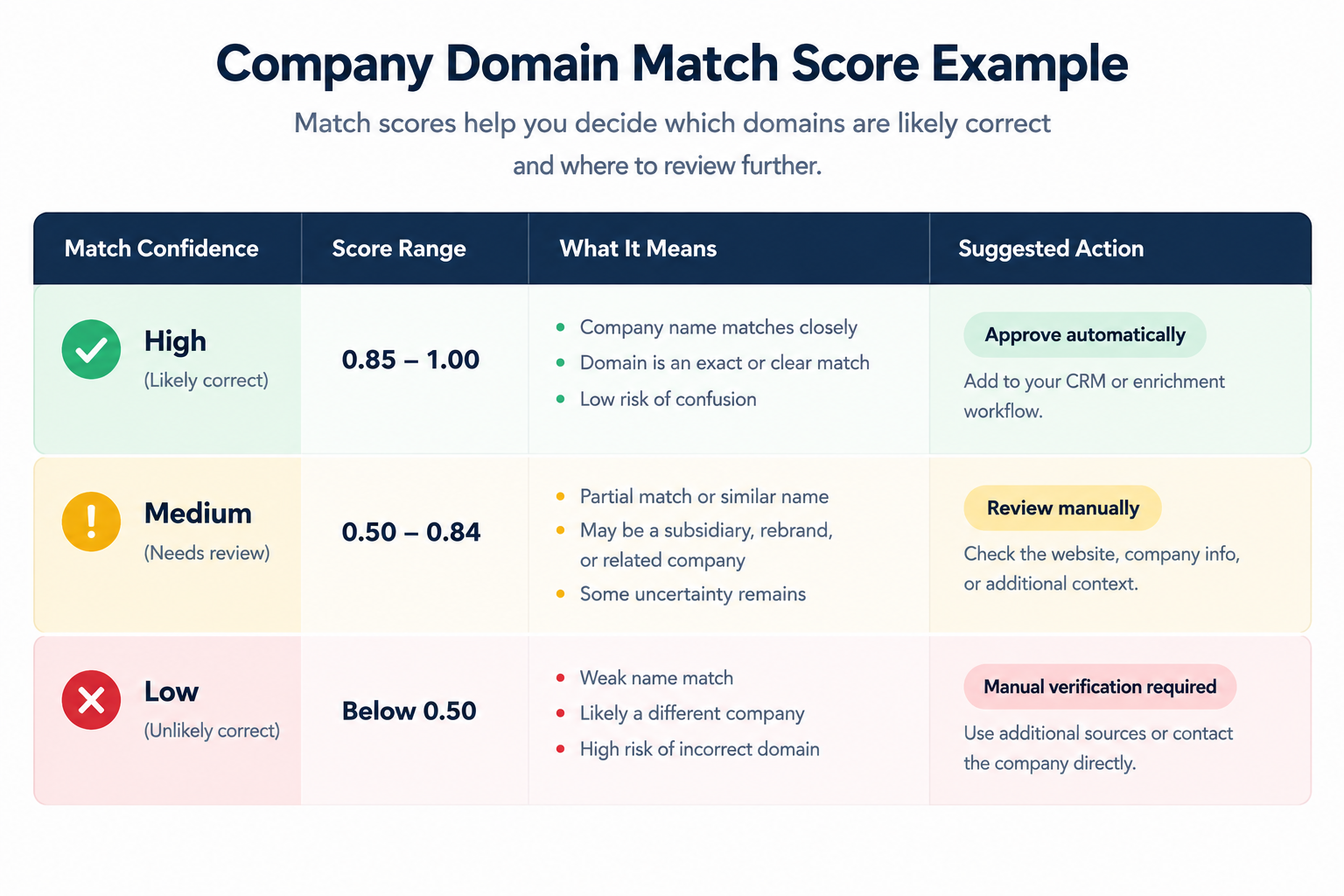
A match score gives your workflow a practical way to decide what happens next.
One approach is to compare the input name with the returned company name using string similarity.
The reference implementation uses a Dice coefficient based on character bigrams and adds special handling for whole-word prefixes.
The basic idea is straightforward.
If the input is:
HubSpot
and the returned company is:
HubSpot
the similarity should be extremely high.
If the returned company is:
HubSpot Partners
the score may still be useful, but the workflow should recognize that this is not necessarily the same organization.
This is why a score should be treated as a decision aid, not proof of corporate identity.
For important accounts, additional verification may still be necessary.
Handling Subsidiaries, Rebrands, and Common Names
Some of the hardest records cannot be solved through string matching alone.
Subsidiaries
A parent company may operate a separate brand or subsidiary with its own website.
If your target list names the subsidiary, automatically replacing it with the parent’s domain could produce an inaccurate record.
Rebrands
A company may have changed its public-facing name while its old corporate name remains in databases.
Searching only the exact current or historical name can therefore miss the relevant domain.
Common company names
Names such as “Summit,” “Pioneer,” “United,” or “Atlas” can produce many possible organizations.
For these records, additional information such as location, industry, company size, or an existing contact email can help distinguish candidates.
Regional businesses
A company may use a country-specific domain rather than a .com domain.
Do not assume that .com is automatically the correct answer simply because it is familiar.
Bulk Company URL Lookup
Manual research becomes inefficient once the dataset grows.
A bulk company URL lookup workflow can process a list such as:
Company A
Company B
Company C
Company D
...
and produce a structured output:
input
matched_name
domain
url
score
band
status
alternatives
This makes the result easier to review, export, and feed into another system.
The reference API guide demonstrates both JavaScript and Python workflows for processing multiple company names and exporting results for use in spreadsheets or other systems.
For a large dataset, the important design principle is not simply speed. It is controlled automation.
A good bulk process should:
- Normalize names.
- Query the lookup source.
- Record the response.
- Score candidate matches.
- Separate successful matches from failures.
- Flag ambiguous records.
- Preserve alternatives.
- Export the final dataset.
- Sample-check the results.
Separate “Not Found” From Technical Failures
This is a small implementation detail with a big practical impact.
There is a difference between:
The company could not be matched
and:
The lookup request failed.
If an API request times out and your script records every failed request as “company not found,” you may incorrectly conclude that thousands of companies have missing domains.
The documented implementation deliberately separates ok, not_found, and request_failed statuses for this reason.
That distinction should also exist in your database.
A useful status structure could be:
oknot_foundrequest_failedneeds_review
This makes troubleshooting much easier.
Free Lookup Tools vs. Production-Grade APIs
Free tools can be useful for experimentation, internal scripts, and small projects.
The reference documentation describes the Clearbit Autocomplete endpoint as free and usable without an API key, while also noting that it is undocumented, unsupported, has no published rate limit, and has no SLA.
That distinction matters.
A free endpoint may be perfectly reasonable for testing a concept. It is a different question whether it should become a critical dependency inside a production enrichment platform.
When evaluating a domain lookup provider, consider:
| Factor | Why It Matters |
|---|---|
| Accuracy | Determines how much manual cleanup is required |
| Coverage | Affects how many companies can be matched |
| API stability | Reduces unexpected workflow failures |
| Rate limits | Determines practical bulk-processing capacity |
| Documentation | Makes integration easier |
| Support | Matters for production systems |
| Cost | Important at larger volumes |
| Export options | Useful for operations teams |
Do not choose a provider based solely on the number of domains it claims to identify.
Test it against your own data.
How to Build a Reliable Domain Verification Workflow
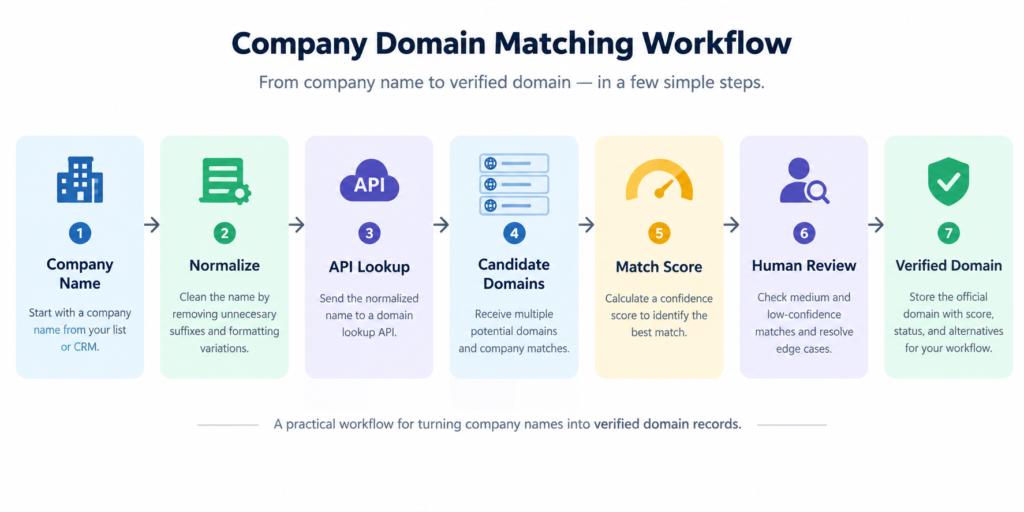
A robust process can be simple:
Input → Normalize → Lookup → Rank → Score → Verify → Export
For example:
Input
Acme Technologies Inc.
Normalized query
Acme
Candidate results
Several possible companies
Matching
Compare the original and normalized names with candidate names.
Confidence
Assign a score and band.
Verification
Review Medium and Low matches.
Export
Save the approved domain alongside the original company record.
The most important design principle is to avoid treating automation as certainty.
Automation should reduce repetitive work while leaving an obvious path for human review when the evidence is weak.
Common Mistakes to Avoid
Taking the first result automatically
The first candidate may be relevant without being correct.
Treating a similarity score as proof
A high textual similarity does not establish ownership or corporate identity.
Combining API failures with missing companies
A timeout is not evidence that a company has no website.
Ignoring subsidiaries
Parent-company and subsidiary relationships can create legitimate domain differences.
Assuming every company uses .com
Country-code and other top-level domains are common.
Removing too much from the company name
Normalization should simplify names, not destroy information needed to distinguish organizations.
Skipping manual review entirely
Even a strong automated workflow should provide a review path for ambiguous records.
When Manual Verification Still Makes Sense
Automation is valuable, but not every record deserves the same treatment.
Manual review is particularly useful for:
- High-value target accounts
- Common company names
- Newly rebranded companies
- Acquisitions and mergers
- Parent/subsidiary relationships
- Companies with multiple regional domains
- Low-confidence API results
For these cases, check the company’s public website, official documentation, corporate information, or other reliable first-party evidence.
Domain registration information can sometimes provide additional context, although registration records should not be treated as proof that the website represents the exact business you intended. ICANN’s current registration-data system uses RDAP for gTLD registration information, replacing the older WHOIS system as the definitive source for this purpose.
Measure Your Own Matching Accuracy
There is no universal match percentage that will accurately predict performance on every prospect database.
A dataset containing well-known technology companies will behave differently from one containing small local contractors.
Instead, create a test sample from your own records.
For example:
- Select 100–500 company names.
- Manually determine the correct domains.
- Run your automated lookup.
- Compare the results.
- Separate High, Medium, and Low matches.
- Calculate the percentage that require correction.
- Investigate recurring failure patterns.
- Adjust the workflow.
This produces a much more meaningful company domain match score for your particular use case.
The reference API guide similarly recommends measuring accuracy on your own data rather than relying on headline performance claims.
The Bigger Role of Domain Research in Lead Enrichment
A domain is often only the first step.
Once a reliable domain has been identified, it can become the key used by later enrichment processes.
For example:
Company name → Domain → Company profile → Contacts → Segmentation → Outreach
That makes domain matching an important part of CRM data hygiene.
If the first step is wrong, later enrichment may be built on the wrong organization.
If the first step is reliable, downstream systems have a much stronger foundation.
Read More: 6 B2B Lead Finder Tools You Can Use to Generate Leads
Frequently Asked Questions
What is Target Company URL Research?
It is the process of identifying the correct website domain associated with a target company, usually from a company name or business record.
What is the easiest way to find an official company website?
For a small number of companies, a direct search and first-party verification can work well. For larger datasets, a company-name-to-domain lookup service can automate candidate discovery, followed by match scoring and review.
Can I perform a bulk company URL lookup?
Yes. A script or API workflow can process a list of company names and return domains, match scores, statuses, and alternative candidates. The documented reference workflow provides JavaScript and Python examples.
Is a high domain match score enough?
No. A score indicates textual similarity or confidence according to the matching method. It does not independently prove that the domain belongs to the exact organization you intended.
What should I do when no domain is returned?
First determine whether the company genuinely lacks a match or whether the lookup request failed. Keeping not_found and request_failed as separate statuses helps prevent misleading results.
Are free company website finder tools reliable enough for production?
They can be useful for testing and smaller workflows, but production use depends on factors such as stability, coverage, rate limits, documentation, support, and accuracy. Test any service against your own dataset before making it a critical dependency.
How should I handle subsidiaries?
Keep the subsidiary and parent company separate when they represent different entities or websites. Use additional business context rather than relying solely on name similarity.
About the Author
Gordon Smith writes about practical SEO, digital technology, data workflows, and tools that help businesses improve their online operations. His work includes practical research into domain lookup APIs, B2B prospect-list cleanup, company-name matching, and edge cases involving subsidiaries, rebrands, and similarly named organizations.